
Vehicle identification number (VIN) plate
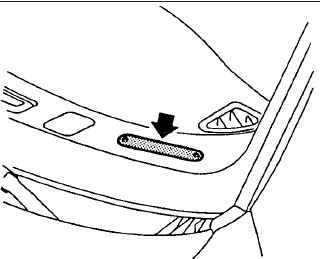
The vehicle identification number (VIN) plate is located as shown. This number is the identification for your vehicle and is used in the vehicle registration.
The vehicle identification number (VIN) number is also available through the center display screen.
See your “Navigation System Owner’s Manual” for further information.
See also:
Hill start assist system
WARNING
Never rely exclusively on the hill start assist system to prevent the vehicle from rolling backward on an
incline. Always remain attentive and ready to control the Nissan Murano wit ...
Steering Assist with HD map data
(a feature of ProPILOT Assist 2.1)
On a vehicle equipped with ProPILOT Assist 2.1, the ProPILOT Assist 2.1 mode indicator turns blue when all
conditions required for Hands Off operation have been satisfied.
When ProPILOT Assist 2. ...
Measurement of weights
Secure loose items to prevent weight shifts
that could affect the balance of your
vehicle. When the vehicle is loaded, drive
to a scale and weigh the front and the rear
wheels separately to determ ...