
Nissan Rogue. Nissan Rogue 2008-2026 Owner's Manual
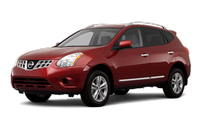
Like many of the two dozen or so compact crossovers on the market today, the Nissan Rogue seeks to provide the all-weather capability and commanding driving position of an SUV, along with the maneuverability and fuel efficiency of a typical car. It does this quite well, and it also adds bold, son-of-Murano styling to make it desirable for its form as well as its function.
- Foreword
- Read first — then drive safely
- When reading the manual
- Important information about this manual
- California proposition 65 warning
- California perchlorate advisory
- Nissan customer care program
- Illustrated table of contents
- Seats, seat belts and Supplemental Restraint System (SRS)
- Exterior front
- Exterior rear
- Passenger compartment
- Instrument panel
- Meters and gauges
- Engine compartment
- Warning and indicator lights
- Safety — Seats, seat belts and supplemental restraint system
- Instruments and controls
- Instrument panel
- Meters and gauges
- Compass (if so equipped)
- Warning/indicator lights and audible reminders
- Vehicle information display
- Security systems
- Windshield wiper and washer switch
- Rear window wiper and washer switch
- Rear window and outside mirror defroster switch
- Headlight and turn signal switch
- Hazard warning flasher switch
- Horn
- Heated seats (if so equipped)
- Vehicle Dynamic Control (VDC) OFF switch
- Power outlet
- Storages
- Windows
- Moonroof (if so equipped)
- Interior lights
- Vanity mirror lights (if so equipped)
- Cargo light
- HomeLink® Universal Transceiver (if so equipped)
- Pre-driving checks and adjustments
- Keys
- Doors
- Remote keyless entry system (if so equipped)
- Intelligent Key system (if so equipped)
- Hood
- Lift gate
- Fuel-filler door
- Steering wheel
- Sun visors
- Mirrors
- Center display, heater, air conditioner, audio, phone and voice recognition systems
- Safety note
- Control panel buttons — color screen with navigation system (if so equipped)
- RearView monitor (if so equipped)
- Around viewTM monitor (if equipped)
- Ventilators
- Heater and air conditioner
- Audio system
- Car phone and CB radio
- Bluetooth® Hands-Free Phone System (if so equipped)
- Starting and driving
- Precautions when starting and driving
- Ignition switch
- Before starting the engine
- Starting the engine
- Driving the vehicle
- Parking brake
- Cruise control
- Break-in schedule
- Increasing fuel economy
- Sonar system (if so equipped)
- All-Wheel Drive (AWD) (if so equipped)
- Parking/parking on hills
- Electric power steering system
- Brake system
- Vehicle Dynamic Control (VDC) system
- Cold weather driving
- In case of emergency
- Appearance and care
- Maintenance and do-it-yourself
- Maintenance requirement
- General maintenance
- Maintenance precautions
- Engine compartment check locations
- Engine cooling system
- Engine oil
- Continuously Variable Transmission (CVT) fluid
- Brake fluid
- Window washer fluid
- Battery
- Drive belts
- Spark plugs
- Air cleaner
- Windshield wiper blades
- Rear window wiper blade
- Brakes
- Fuses
- Battery replacement
- Lights
- Wheels and tires
- Technical and consumer information
- Capacities and recommended fuel/lubricants
- Specifications
- When traveling or registering your vehicle in another country
- Vehicle identification
- Installing front license plate
- Vehicle loading information
- Towing a trailer
- Uniform tire quality grading
- Emission control system warranty
- Reporting safety defects
- Readiness for Inspection/Maintenance (I/M) test
- Event Data Recorders (EDR)
- Owner’s Manual/Service Manual order information
See also:
Exterior and interior lights
* See a NISSAN dealer for replacement.
Always check with the Parts Department at a NISSAN dealer for the latest parts
information.
1. Headlight assembly
2 Map light
3 Personal light
4. Fo ...
Fuel efficient driving tips
Follow these easy-to-use Fuel Efficient Driving
Tips to help you achieve the most fuel economy
from your vehicle.
1. Use smooth accelerator and brake pedal
application.
• Avoid rapid starts ...
Camera unit maintenance
The rear camera unit 1 for the LDW/BSW
systems is located above the rear licence plate.
To maintain the proper operation of the LDW/
BSW systems and help keep the system
functioning, be sure t ...