
Meters and gauges
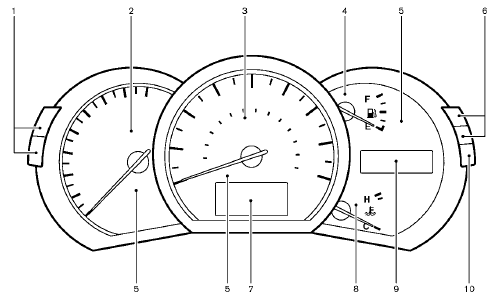
1. Instrument brightness control switch
2. Tachometer
3. Speedometer
4. Fuel gauge
5. Warning/indicator lights
6. Trip computer switch
7. Dot matrix liquid crystal display
— Trip computer
8. Engine coolant temperature gauge
9. Odometer/twin trip odometer/Continuously Variable
Transmission (CVT) position indicator
10. RESET switch for trip odometer
The needle indicators may move slightly after the ignition switch is pushed to the LOCK position. This is not a malfunction.
CAUTION
• For cleaning, use a soft cloth, dampened with water. Never use a rough cloth, alcohol, benzine, thinner or any kind of solvent or paper towel with a chemical cleaning agent.
They will scratch or cause discoloration
to the lens.
• Do not spray any
liquid such as
water on the meter lens. Spraying
liquid may cause the system to
malfunction.
See also:
Tire chains
WARNING If tire chains are used on the Nissan Murano, they must provide sufficient clearance
between the tire and the nearest suspension, brake, or body component. Using chains of the wrong size o ...
Draining of coolant water
If the vehicle is to be left outside without antifreeze,
drain the cooling system, including the
engine block. Refill before operating the vehicle.
For details, see “Engine cooling system” in ...
Heated steering wheel (if so equipped)
The heated steering wheel system is designed
to operate only when the surface temperature of
the steering wheel is below 688F (208C).
Push the heated steering wheel switch to warm
the steering ...