
Turn signal switch
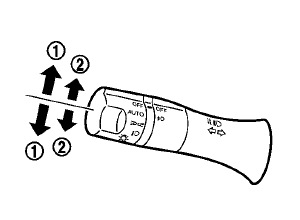
1 Turn signal
Move the lever up or down to signal the turning direction. When the turn is completed, the turn signals cancel automatically.
2 Lane change signal
To indicate a lane change, move the lever up or down to the point where lights begin flashing.
See also:
Battery
• Keep the battery surface clean
and dry.
Clean the battery with a solution of baking
soda and water.
• Make certain the terminal
connections are
clean and securely tightened.
• If th ...
Extending engine run time
The remote start feature can be extended one
time by performing the steps listed in “Remote
starting the vehicle” in this section. Run time will
be calculated as follows:
● The first 10 ...
Child restraints
Precautions on child restraints
- Failure to follow the warnings and instructions for proper use and installation
of child restraints could result in serious injury or death of a child or other ...