
Hardtop models
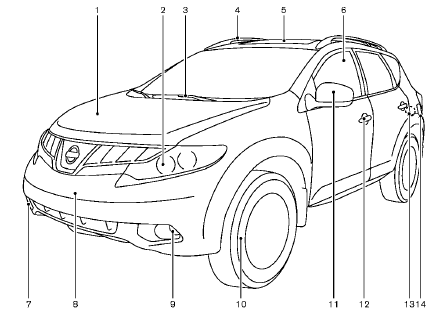
1. Hood
2. Headlight and turn signal lights
— Switch operation
— Bulb replacement
3. Windshield wiper and washer
— Switch operation
— Rain-sensing auto wiper system
— Blade replacement
— Window washer fluid
4. Roof rack (rail)
5. Moonroof
6. Power windows
7. Recovery hook
8. License plate installation
9. Fog lights
— Switch operation
— Bulb replacement
10. Tires
— Wheel and tires
— Flat tire
— Tire Pressure Monitoring System (TPMS)
11. Outside mirrors
12. Doors
— Keys
— Door locks
— Intelligent Key system
— Security system
13. Child safety rear door lock
14. Fuel-filler door
— Operation
— Fuel recommendation
*: if so equipped
See also:
Rear-facing child restraint installation using the seat belts
WARNING
The three-point seat belt with Automatic
Locking Retractor (ALR) must be used
when installing a child restraint. Failure to
use the ALR mode will result in the child
restraint not being p ...
Installing front license plate
Use the following steps to mount the license plate:
Before mounting the license plate, confirm that the following parts are enclosed
in the plastic bag.
- License plate bracket
- J-nut 6 2
- S ...
Control panel buttons — color screen with Navigation System (if so equipped)
1. ZOOM OUT button*
2. CAMERA button**
3. DEST button*
4. ROUTE button*
5. NISSAN controller
6. STATUS button
7. INFO button
8. + (brightness control) button
9. OFF brightness control butto ...