
Hardtop models
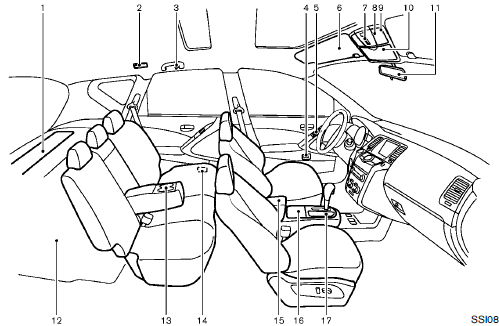
1. Cargo cover
2. Rear personal light
3. Coat hooks
4. Automatic drive positioner switch
5. Door armrest
— Power window switch
— Power door lock switch
— Outside mirror remote control switch
6. Sun visors
7. Moonroof
8. Front map lights
9. Mood light
10. Sunglasses holder
11. Inside rearview mirror
— HomeLink® universal transceiver
— Compass
12. Cargo area
— Storages
— Luggage hooks
— Cargo light
— Spare tire
13. Rear cup holders
14. Heated seat switch (rear)
15. Console box
— Power outlet
— Auxiliary input jacks
— iPod® connector
— USB connector
16. Front cup holders
17. Storage box or Cigarette lighter/
Ashtray
*: if so equipped
See also:
Luggage side box (Hardtop models)
To open the luggage side box, pull up the strap. ...
Hardtop models
CAUTION
• Do not store the main sun visor
before storing the extension sun
visor.
• Do not pull the extension sun visor
forcedly downward.
1. To block out glare from the front, swing
down ...
Warning lights
For additional information on warnings and indicators,
see “Vehicle information display” later in
this section.
Anti-lock Braking System
(ABS) warning light
When the ignition switch is placed ...