
CrossCabriolet models
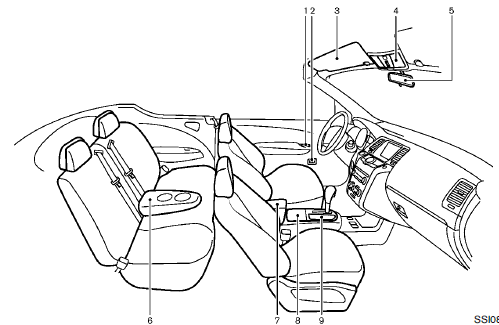
1. Door armrest
— Power window switch
— Power door lock switch
— Outside mirror remote control switch
2. Automatic drive positioner switch
3. Sun visors
4. Front map lights
5. Inside rearview mirror
— HomeLink® universal transceiver
— Compass
6. Rear cup holders
7. Console box
— Power outlet
— Auxiliary input jacks
— iPod® connector
— USB connector
8. Front cup holders
9. Storage box
*: if so equipped
See also:
Exterior rear
1. Moonroof (if so equipped)/panoramic
sunshade (if so equipped)
2. Antenna
3. Rear window wiper and washer switch
4. Liftgate release
5. Rearview monitor (if so equipped)
6. Replacing bulbs
...
Operating the manual liftgate (if so equipped)
Liftgate switch
Instrument panel switch
The power door lock system allows you to lock or
unlock all doors including the liftgate simultaneously.
To open the liftgate, pull up on the handle ...
Precautions when starting and driving
- Do not leave children or adults who would normally require the support of
others alone in your vehicle. Pets should not be left alone either. They could accidentally
injure themselves or other ...