
Luggage side box (Hardtop models)
Nissan Murano / Nissan Murano 2009-2026 Owner's Manual / Instruments and controls / Storage / Luggage side box (Hardtop models)
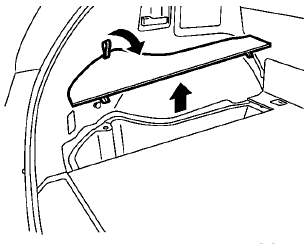
To open the luggage side box, pull up the strap.
See also:
Maintenance requirement
Some day-to-day and regular maintenance is
essential to maintain your vehicle’s fine mechanical
condition, as well as its emission and engine
performance.
It is the owner’s responsibility to ...
Connecting procedure
1. Push the PHONE button or the
button,
and select the “Connect Phone” key.
2. When a PIN code appears on the screen,
operate the compatible Bluetooth® cellular
phone to enter the PIN ...
LDW system operation
The LDW system operates above approximately
43 MPH (70 km/h).
When the vehicle approaches either the left or
the right of the traveling lane, the LDW system
will chime a sound and the LDW light ...