
Camera aiding sonar (parking sensor)
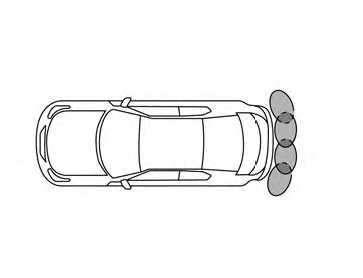
The sonar (parking sensor) sounds a tone to inform the driver of obstacles near the bumper.
The colors of the sonar indicators and the distance guide lines in the front, front-wide, rear and rear-wide views indicate different distances to the object.
WARNING
● The sonar (parking sensor) is a convenience
feature. It is not a substitute for
proper parking.
● The driver is always responsible for
safety during parking and other
maneuvers.
● Always look around and check that it is
safe to move before parking.
● Read and understand the limitations of
the sonar (parking sensor) as contained
in this section.
● The colors of the sonar indicators and
the distance guide lines in the rear view
indicate different distances to the
object.
● Inclement weather or Ultrasonic
sources such as an automatic car wash,
a truck’s compressed-air brakes or a
pneumatic drill may affect the function
of the system; this may include reduced
performance or a false activation.
● This function is designed as an aid to
the driver in detecting large stationary
objects to help avoid damaging the
vehicle.
● The system is not designed to prevent
contact with small or moving objects.
● The system will not detect small objects
below the bumper, and may not detect
objects close to the bumper or on the
ground.
● The system may not detect the following
objects:
– Fluffy objects such as snow, cloth,
cotton, glass or wool.
– Thin objects such as rope, wire or
chain.
– Wedge-shaped objects.
● If your vehicle sustains damage to the bumper fascia, leaving it misaligned or bent, the sensing zone may be altered causing inaccurate measurement of objects or false alarms.
CAUTION
● Excessive noise (such as audio system
volume or an open vehicle window) will
interfere with the tone and it may not be
heard.
● Keep the surface of the sonar sensors
(located on the front and rear bumper
fascia) free from accumulations of
snow, ice and dirt. Do not scratch the
surface of the sonar sensors when
cleaning. If the sensors are covered, the
accuracy of the sonar function will be
diminished.
The system gives the tone for rear objects when the shift selector is in the R (Reverse) position.
The system is deactivated at speeds above 6 mph (10 km/h). It is reactivated at lower speeds.
When the objects are detected, the indicator (green) appears and blinks and the tone sounds intermittently. When the vehicle moves closer to the object, the color of the indicator turns yellow and the rate of the blinking and the rate of the tone increase. When the vehicle is very close to the object, the indicator stops blinking and turns red, and the tone sounds continuously.
The intermittent tone will stop after three seconds when an object is detected by only the corner sonar and the distance does not change.
The tone will stop when the object gets away from the vehicle.
In the below cases, the sonar will be turned back on automatically:
● When the shift selector is in the R (Reverse)
position.
● When the CAMERA button is pressed and a
screen other than the camera view is shown
on the display.
● When vehicle speed decreases below approximately
6 mph (10 km/h).
● When the ignition switch is placed in the
OFF position and turned back to the ON
position again.
See also:
Rear window wiper and washer switch
In freezing temperatures the washer solution may freeze on the rear window
glass and obscure your vision. Warm the rear window with the defroster before you
wash the rear window.
- Do not ope ...
Heated seats (if so equipped)
WARNING
Do not use or allow occupants to use
the seat heater if you or the occupants
cannot monitor elevated seat temperatures
or have an inability to feel pain in
body parts that contact the sea ...
AM radio reception
AM signals, because of their low frequency, can
bend around objects and skip along the ground.
In addition, the signals can be bounced off the
ionosphere and bent back to earth. Because of
these ...