
Mood lights (Hardtop models)
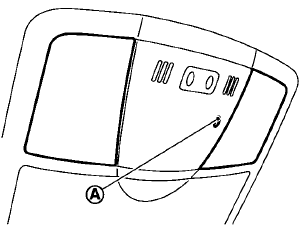
Map lights
The mood lights A located in the following
positions will illuminate whenever the headlight
switch is in the  or
or  position.
• next to the
map lights
• under the
instrument panel
• under the
driver’s power window switch
The brightness of the mood lights can be adjusted with the illumination control buttons.
See “Instrument brightness control” earlier in this section.
See also:
Braking precautions
The brake system has two separate hydraulic
circuits. If one circuit malfunctions, you will still
have braking at two wheels.
Vacuum assisted brakes
The brake booster aids braking by using engin ...
How to select menus on the screen
Vehicle functions are viewed on the center display
screen in menus. Whenever a menu selection
is made or menu item is highlighted, different
areas on the screen provide you with important
inform ...
Before starting the engine
• Make sure the area around the vehicle
is
clear.
• Check fluid levels such as engine oil,
coolant,
brake fluid and window washer fluid as
frequently as possible, or at least whenever
you ...