
Mechanical key
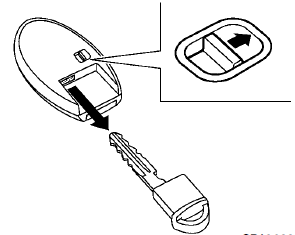
To remove the mechanical key, release the lock knob at the back of the key.
To install the mechanical key, firmly insert it into the key until the lock knob returns to the lock position.
Use the mechanical key to lock or unlock the doors and glove box, if they are equipped with a key cylinder.
See “Doors” later in this section and “Storage” in the “2. Instruments and controls” section.
CAUTION
Always carry the mechanical key installed in the key.
See also:
Three-point type seat belt with retractor
WARNING
● Every person who drives or rides in this
vehicle should use a seat belt at all
times.
● Do not ride in a moving vehicle when
the seatback is reclined. This can be
dangerous ...
Intelligent Key system
Type A
Type B
Type C
1. Intelligent Key (2)
2. Mechanical key (inside the key) (2)
3. Key number plate (1)
Your vehicle can only be driven with the
Intelligent Keys which are registered t ...
Indicator lights
All-Wheel Drive (AWD) LOCK
indicator light (AWD models)
This light illuminates when the ignition switch is
placed in the ON position, and turns off within 1
second.
When selecting the LOCK mode ...