
Locking with power door lock switch
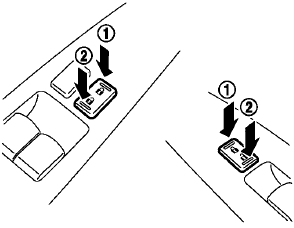
Operating the power door lock switch will lock or unlock all the doors. The switches are located on the driver’s and front passenger’s door armrests.
To lock the doors, push the power door lock switch to the lock position 1 with the driver’s or front passenger’s door open, then close the door.
When locking the door this way, be certain not to leave the Intelligent Key inside the vehicle.
unlock the doors, push the power door lock switch to the unlock position2 .
Lockout protection
When the power door lock switch (driver or front passenger) is moved to the lock position with the Intelligent Key in the port and any door open, all doors will lock and unlock automatically. With the Intelligent Key left in the vehicle (not in the Intelligent Key port) and any door open, all doors will unlock automatically and a chime will sound after the door is closed.
These functions help to prevent the Intelligent Key from being accidentally locked inside the vehicle.
See also:
How to switch the display
A : Original screen before the RearView
Monitor is operated
B : Rear-wide view screen
C : Rear view screen
1 : Shift lever is moved into the R(Reverse)
position
2 : Shift lever is moved out of ...
Emergency engine shut off
To shut off the engine in an emergency situation
while driving perform the following procedure:
• Rapidly push the push-button
ignition switch
3 consecutive times in less than 1.5
seconds, or
...
Making a call
To make a call, follow the procedures below.
1. Push the button on the
steering wheel.
A tone will sound.
2. Speak: “Call”. The system acknowledges
the command and announces the next se ...