
Heater and air conditioner
WARNING
• The air conditioner cooling function
operates only when the engine is
running.
• Do not leave children or adults who
would normally require the support
of others alone in your vehicle. Pets
should not be left alone either. On
hot, sunny days, temperatures in a
closed vehicle could quickly become
high enough to cause severe or
possibly fatal injuries to people or
animals.
• Do not use the recirculation mode
for long periods as it may cause the
interior air to become stale and the
windows to fog up.
Start the engine and operate the heater and air conditioner system.
You can individually set the driver and front passenger side temperature using each temperature control buttons.
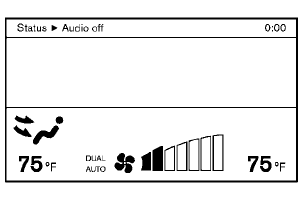
Models with navigation system
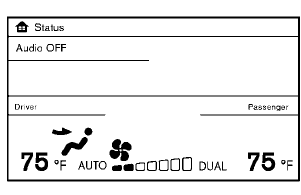
Models without navigation system
For the models with the color display screen, push the “STATUS” button to display the heater and air conditioner status screen. (See “How to use STATUS button” earlier in this section.)
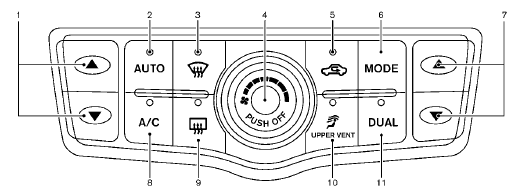
Type A
1. Temperature control button (driver side)
2. “AUTO” automatic air conditioner ON button
3. “ ” front defroster button
4. “ ” fan speed control dial/OFF
button
” fan speed control dial/OFF
button
5. “  ” intake air control button
6. “MODE” manual air flow control button
7. Temperature control button (passenger side)
8. “A/C” air conditioner ON/OFF button
9. “  ” rear window defroster button
(See “Rear
window and outside mirror defroster switch” in
the “2. Instruments and controls” section.)
” rear window defroster button
(See “Rear
window and outside mirror defroster switch” in
the “2. Instruments and controls” section.)
10. “ ” upper vent system button
11. “DUAL” zone control ON/OFF button
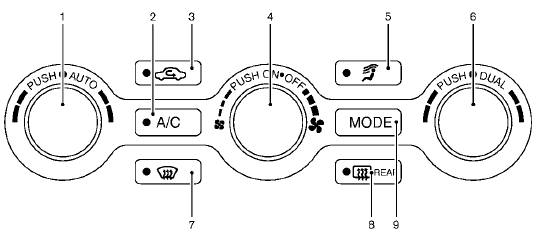
Type B
1. “AUTO” automatic air conditioner ON button/
Temperature control dial (driver side)
2. “A/C” air conditioner ON/OFF button
3. “  ” intake air control button
4. “ ” fan speed control
dial/ON/OFF button
” fan speed control
dial/ON/OFF button
5. “  ” upper vent system button
6. “DUAL” zone control ON/OFF button/Temperature
control dial (passenger side)
7. “  ” front defroster button
8. “ ” rear window defroster button
(See “Rear
window and outside mirror defroster switch” in
the “2. Instruments and controls” section.)
” rear window defroster button
(See “Rear
window and outside mirror defroster switch” in
the “2. Instruments and controls” section.)
9. “MODE” manual air flow control button
- Automatic operation
- Manual operation
- To turn the system ON/OFF
- Operating tips
- In-cabin microfilter
- Servicing air conditioner
See also:
Phone settings
Call
• (a name)
If there are entries stored in the Phone Book,
a number associated with a name and
location can be dialed. See “Phone book
registration” in this section to learn how to
s ...
List of voice commands
When you press and release the
button on
the steering wheel, you can choose from the
commands on the Main Menu. The following
pages describe these commands and the commands
in each sub-menu.
...
If your vehicle overheats
- Do not continue to drive if your vehicle overheats. Doing so could cause
engine damage or a vehicle fire.
- To avoid the danger of being scalded, never remove the radiator cap while the
engin ...