
Exterior front
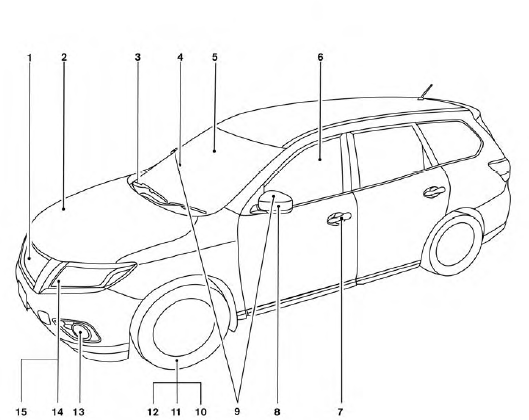
1. Front view camera (if so equipped)
2. Engine hood
3. Windshield wiper and washer switch,
wiper blades
4. Windshield-washer fluid
5. Compass display (if so equipped)
6. Power windows
7. Door locks, NISSAN Intelligent Key®,
Remote Engine Start (if so equipped),
keys
8. Mirrors
9. Side view camera (if so equipped)
10. Tire pressure monitoring system
(if so equipped)
11. Flat tire
12. Tire chains
13. Fog light switch (if so equipped)
14. Replacing bulbs
15. Headlight and turn signal switch
See the page number indicated in parentheses for operating details.
See also:
Motion-Activated Liftgate
Basic information
The liftgate can be opened or closed without using your hands by making a quick kicking motion beneath the center
of the rear bumper. This feature is useful when approaching the ...
Care of the soft top and the vehicle body
To use your CrossCabriolet safely and comfortably,
you need to observe all the warnings and
cautions shown in the previous pages. Also, to
maintain a good appearance of the soft top and
the vehicl ...
Cruise control operations
1. ACCEL/RES switch
2. COAST/SET switch
3. CANCEL switch
4. MAIN (ON·OFF) switch
The cruise control allows driving at a speed
between 25 to 90 MPH (40 to 144 km/h)
without keeping your foot o ...