
Passenger compartment
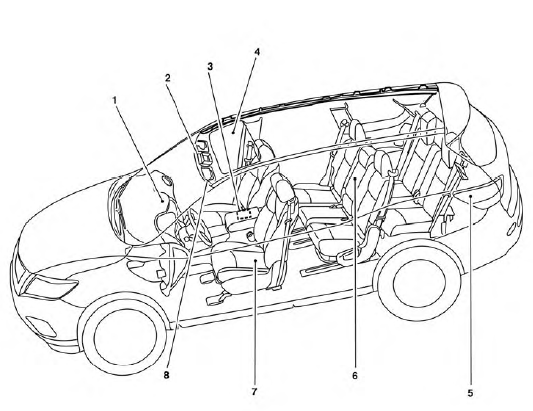
1. Glove box, Console box
2. Map lights
3. Storage
4. Moonroof (if so equipped)/Panoramic
sunshade (if so equipped)
5. Luggage hooks
6. Cup holders
7. Seats
8. Sun visors
See the page number indicated in parentheses for operating details.
See also:
Brakes
If the brakes do not operate properly, have the brakes checked by a NISSAN dealer.
Self-adjusting brakes
Your vehicle is equipped with self-adjusting brakes.
The disc-type brakes self-adjust every ...
Luggage cover
The soft top can be operated only when the
trunk is separated by the luggage cover. The
luggage cover must be pulled out and hung on
the hooks or the top will not operate.
(See “Luggage cover ...
Jump starting
To start your engine with a booster battery, the
instructions and precautions below must be followed.
WARNING
● If done incorrectly, jump starting can
lead to a battery explosion, resulting ...