
Turn signal switch
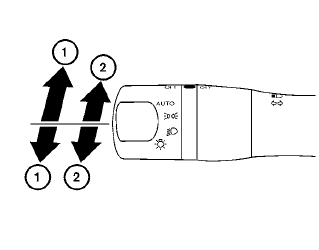
Turn signal
1 Move the lever up or down to signal the turning direction. When the turn is completed, the turn signal cancels automatically.
Lane change signal
2 To signal a lane change, move the lever up or down to the point where the indicator light begins to flash, but the lever does not latch.
The turn signal will flash three times automatically.
See also:
Read first — then drive safely
Before driving your vehicle, read your Owner’s Manual carefully. This will ensure
familiarity with controls and maintenance requirements, assisting you in the safe
operation of your vehicle.
...
Passenger compartment. Instrument panel
Passenger compartment
Power moonroof, if so equipped, located above the seating area and operated through the interior controls.
Console box, providing covered storage between the ...
Booster seats
Precautions on booster seats
WARNING
If a booster seat and seat belt are not used
properly, the risk of a child being injured
in a sudden stop or collision greatly
increases:
– Make sure the s ...