
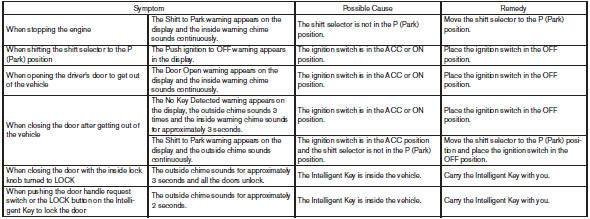
Troubleshooting guide
Verify the location of all Intelligent Keys that are programmed for the vehicle. If another Intelligent Key is in range or inside the vehicle, the vehicle system may respond differently than expected.

See also:
Front power seat adjustment (if so equipped)
Operating tips
● The power seat motor has an auto-reset
overload protection circuit. If the motor
stops during operation, wait 30 seconds,
then reactivate the switch.
● Do not operate ...
Underbody
In areas where road salt is used in winter, it is
necessary to clean the underbody regularly in
order to prevent dirt and salt from building up and
causing the acceleration of corrosion on the unde ...
How to select menus on the screen
Vehicle functions are viewed on the center display
screen in menus. Whenever a menu selection
is made or menu item is highlighted, different
areas on the screen provide you with important
inform ...