
Vents
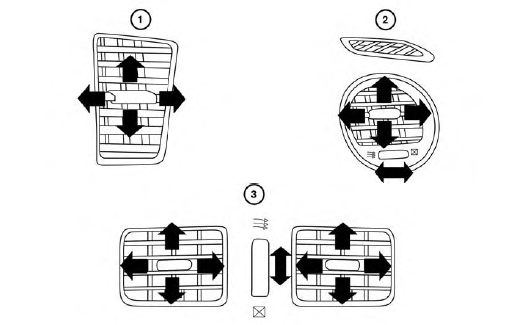
Adjust air flow direction for the driver’s and passenger’s side vents 1 , center vents 2 , and rear vents 3 by moving the vent slide and/or vent assemblies.
Open or close the vents using the dial. Move the
dial toward the  to open the vents
or toward
the
to open the vents
or toward
the  to close them.
See also:
Remote starting the vehicle
To use the remote start feature to start the engine
perform the following:
1. Aim the Intelligent Key at the vehicle.
2. Press the LOCK button to lock all
doors.
3. Within 5 seconds press and hol ...
Fuel recommendation
Basic information
Use unleaded regular gasoline with an octane rating of at least 87 AKI (Anti-Knock Index), equivalent to a
Research Octane Number of 91. Selecting fuel that meets this minimum r ...
General maintenance
During the normal day-to-day operation of the
vehicle, general maintenance should be performed
regularly as prescribed in this section. If
you detect any unusual sounds, vibrations or
smell, be su ...