
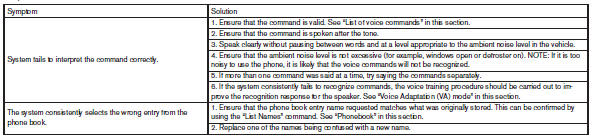
Troubleshooting guide
The system should respond correctly to all voice commands without difficulty. If problems are encountered, try the following solutions.
Where the solutions are listed by number, try each solution in turn, starting with number 1, until the problem is resolved.
See also:
Fuel-filler door
Opening the fuel-filler door
To open the fuel-filler door, press the right side of the door inward until the release mechanism disengages. The
fuel-filler door can then be opened to acc ...
Phone settings
To set up the Bluetooth® Hands-Free Phone
System to your preferred settings, press the SETTING
button on the instrument panel and select
the “Phone” key on the display.
Edit Vehicle Phonebo ...
How to switch the display
A : Original screen before the RearView
Monitor is operated
B : Rear-wide view screen
C : Rear view screen
1 : Shift lever is moved into the R(Reverse)
position
2 : Shift lever is moved out of ...