
Installing front license plate
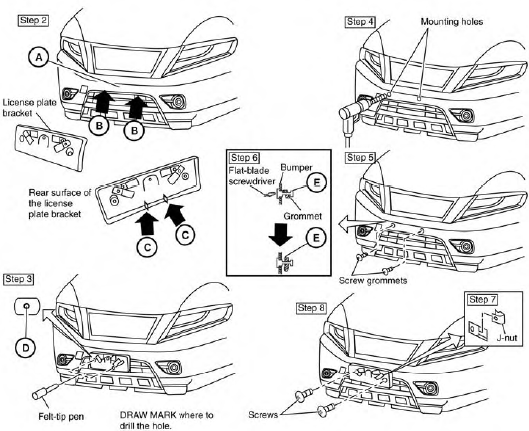
Use the following steps to mount the front license plate:
Before mounting the license plate, confirm that the following parts are enclosed in the plastic bag:
● License plate bracket
● License plate bracket (J-nut) screws x 2
● License plate screws x 2
● Screw grommets x 2
1. Park the vehicle on flat, level ground.
2. Locate the center position A as illustrated.
Line up the license plate bracket under the top of the front bumper B with the tabs C .
Hold the license plate bracket in place.
3. Mark the center of the hole D with a felt-tip
pen.
4. Carefully drill two pilot holes using a 0.39 in
(10 mm) drill bit at the marked locations. (Be
sure that the drill only goes through the
bumper fascia.)
5. Insert the grommets into the holes in the
bumper fascia.
6. Insert a small flat-bladed screwdriver into
the grommet hole to turn the threaded part of
the grommet 90° E .
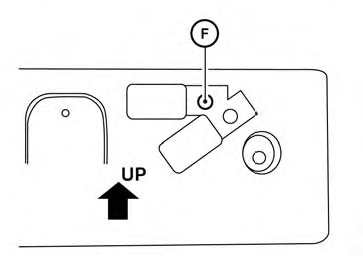
Mark the center of the hole F on both sides with a felt-tip pen. Remove the bracket from the bumper, and then open 0.79 in (20 mm) diameter holes on the bumper using the marks F as a center.
7. Insert a J-nut into the license plate bracket
before placing the license plate bracket on
the fascia.
8. Install the license plate bracket with screws.
9. Install the license plate with bolts that are no
longer than 0.55 in (14 mm).
See also:
Precautions on supplemental restraint system
This Supplemental Restraint System (SRS) section
contains important information concerning
the following systems:
● Driver and passenger supplemental frontimpact
air bag (NISSAN Advanced Air ...
Install
1. Align the head restraint/headrest stalks with the holes in the seat. Make sure the head restraint/headrest is
facing the correct direction before pushing it into place. The stalk with ...
Intelligent 4WD (if so equipped)
4x4i system operation
4WD shift switch
The Four-Wheel Drive (4WD) system is used to
select the 2WD (Two-Wheel Drive), AUTO or
LOCK mode depending on the driving conditions.
Turn the 4WD mode ...