
Passenger compartment
CAUTION
Never use a fuse of a higher or lower amperage rating than specified on the fuse box cover. This could damage the electrical system or cause a fire.
If any electrical equipment does not operate, check for an open fuse.
1. Be sure the ignition switch and the headlight
switch are OFF.
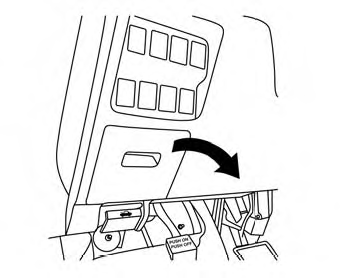
2. Open the glove box to access the fuse box
cover.
3. Pull the fuse box cover to remove.
4. Remove the fuse with the fuse puller.
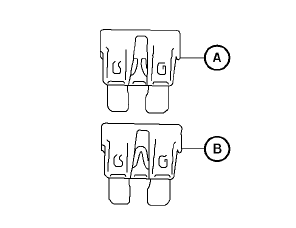
Type A
5. If the fuse is open A , replace it with an
equivalent good fuse B .
6. Push the fuse box cover to install.
7. If a new fuse also opens, have the electrical
system checked and repaired by a NISSAN
dealer.
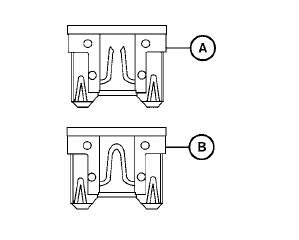
Type B
Extended storage switch
If any electrical equipment does not operate, remove the extended storage switch and check for an open fuse.
NOTE:
The extended storage switch is used for long term vehicle storage. Even if the extended storage switch is broken it is not necessary to replace it. Replace only the open fuse in the switch with a new fuse.
How to replace the extended storage switch:
1. To remove the extended storage switch, be
sure the ignition switch is in the OFF or
LOCK position.
2. Be sure the headlight switch is in the OFF
position.
3. Remove the fuse box cover.
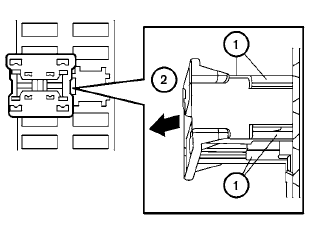
4. Pinch the locking tabs 1 found on each
side of the storage switch.
5. Pull the storage switch straight out from the
fuse box 2 .
See also:
Trunk release power cancel switch
When the switch located inside the glove box is
in the OFF position A , the power to the trunk
lid will be canceled and the trunk lid cannot be
opened by the trunk lid release switch, the trunk
...
Cruise control
1. ACCEL/RES switch
2. COAST/SET switch
3. CANCEL switch
4. ON·OFF switch ...
FM/AM radio with compact disc (CD) changer (if so equipped)
For all operation precautions, see Audio operation
precautions in this section.
Audio main operation
VOL/ON·OFF control:
Place the ignition switch in the ACC or ON
position and push the VOL/ON· ...