
Vehicle load capacity
Do not exceed the load limit of your vehicle shown as “The combined weight of occupants and cargo” on the Tire and Loading Information label. Do not exceed the number of occupants shown as “Seating Capacity” on the Tire and Loading Information label.
To get “the combined weight of occupants and cargo”, add the weight of all occupants, then add the total luggage weight. Examples are shown in the following illustration.
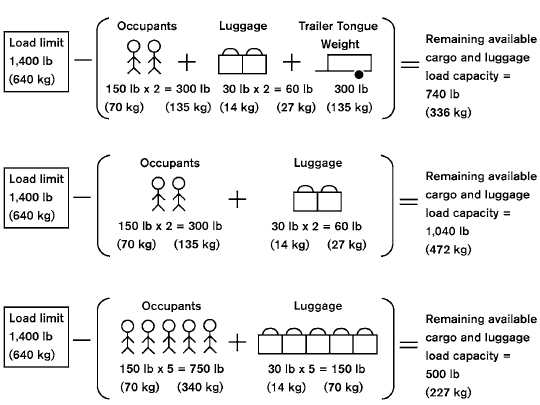
Steps for determining correct load limit
1. Locate the statement “The combined
weight of occupants and cargo
should never exceed XXX lbs or XXX
kg” on your vehicle’s placard.
2. Determine the combined weight of
the driver and passengers that will be
riding in your vehicle.
3. Subtract the combined weight of the
driver and passengers from XXX lbs
or XXX kg.
4. The resulting figure equals the available
amount of cargo and luggage
load capacity. For example, if the
XXX amount equals 1,400 lbs. and
there will be five 150 lb. passengers
in your vehicle, the amount of available
cargo and luggage load capacity
is 650 lbs. (1,400-750 (5 X 150)
= 650 lbs) or (640-340 (5 X 70) =
300 kg.)
5. Determine the combined weight of
luggage and cargo being loaded on
the vehicle. That weight may not
safely exceed the available cargo and
luggage load capacity calculated in
Step 4.
6. If your vehicle will be towing a trailer,
load from your trailer will be transferred
to your vehicle. Consult this
manual to determine how this reduces
the available cargo and luggage
load capacity of your vehicle.
Before driving a loaded vehicle, confirm that you do not exceed the Gross Vehicle Weight Rating (GVWR) or the Gross Axle Weight Rating (GAWR) for your vehicle.
See “Measurement of weights” later in this section.
Also check tires for proper inflation pressures.
See the Tire and Loading Information label.
See also:
Engine compartment check locations
VQ35DE engine
1. Power steering fluid reservoir
2. Engine coolant reservoir
3. Drive belt location
4. Fuse box
5. Engine oil filler cap
6. Brake fluid reservoir
7. Air cleaner
8. Fuse box
...
Troubleshooting guide
If the soft top stops halfway during operation or does not operate normally,
follow the procedures shown in the following table. If the procedures in the
following table do not solve the symptom, i ...
Special winter equipment
It is recommended that the following items be
carried in the vehicle during winter:
● A scraper and stiff-bristled brush to remove
ice and snow from the windows and wiper
blades.
● A ...