
Warning & Indicator Lights
Warning & Indicator Lights (Red)
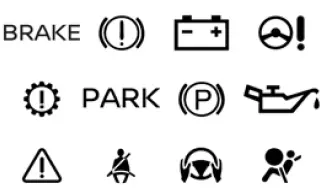
Warning & Indicator Lights (Yellow)
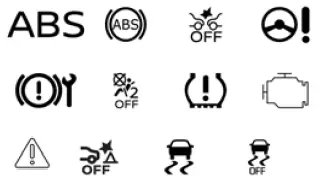
Warning & Indicator Lights (Other)
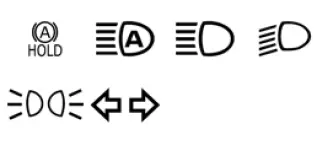
Checking lights
With all doors closed, apply the parking brake, fasten the seat belts and place the ignition switch in the ON position without starting the engine. This allows the Nissan Murano instrument cluster to perform its initial light check and helps the driver confirm that key warning and indicator lights are capable of illuminating. The following lights will come on:
 or
or
 ,
,
 ,
,
 ,
,
 ,
,
 ,
,
 The following lights will come on briefly and then go off, indicating that their related systems have completed
the normal self-check sequence:
The following lights will come on briefly and then go off, indicating that their related systems have completed
the normal self-check sequence:
 ,
,
 or
or
 ,
,
 or
or
 ,
,
 ,
,
 ,
,
 ,
,
 ,
,
 ,
,
 ,
,

If any light fails to come on, remains illuminated when it should turn off, flashes unexpectedly, or operates in a way other than described, it may indicate a burned-out bulb and/or a system malfunction. The light check should be treated as an important part of confirming that the warning system can alert the driver when attention is needed.
Have the system checked. It is recommended that you visit a NISSAN dealer for this service so the warning light circuit, related sensors, and affected vehicle systems can be inspected with the proper diagnostic procedure.
Some indicators and warnings are also displayed in the vehicle information display between the speedometer and tachometer. In the Nissan Murano, these messages may provide additional details that help explain the warning light, system status, or action the driver should take.
See also:
Sun visors
Sun visors
1. To block out glare from the front, swing down the sun visor 1 .
2. To block glare from the side, remove the sun visor from the center mount and
swing it to the side 2 . ...
Turn signal switch
Turn signal
1 Move the lever up or down to signal the
turning direction. When the turn is completed,
the turn signal cancels automatically.
Lane change signal
2 To signal a lane change, move th ...
Liftgate release
Basic information
WARNING
Before driving, always make sure the liftgate is completely closed and securely latched. An improperly
closed liftgate could open unexpectedly while the vehicle ...