
Emergency call (SOS) button
Emergency support
Basic Information
NissanConnect Services provide a range of emergency-related services designed to support the subscribed vehicle and its driver when urgent assistance is needed. In the Nissan Murano, these services can help connect the vehicle with emergency support resources when a serious situation occurs.
For example, if the driver or an occupant experiences illness, serious injury, or another emergency, support can be requested by pressing the in-vehicle Emergency Call (SOS) button. This connects the vehicle to the NissanConnect Services Response Center, where an operator can assist with the emergency request.
The NissanConnect Services Response Center can identify the vehicle location using GNSS information. When necessary, this location information can be provided to police, medical responders, fire departments, or other appropriate agencies so assistance can be directed to the vehicle more effectively.
For details about other NissanConnect Services emergency support features, contact the NissanConnect Customer Support line at 1-855-426-6628, or refer to the NissanConnect Services website at www.nissanusa.com/connect for the U.S., or www.nissan.ca/nissanconnect in English and www.nissan.ca/nissanconnect/fr in French for Canada.
For models with ProPILOT Assist 2.1:
After the vehicle is brought to an emergency stop, the Nissan Murano can be connected to the Emergency Call (SOS) service operator. The operator can then request assistance from public emergency institutions, including police, fire department, or medical services, depending on the situation.
WARNING
- Please note that the Automatic Collision Notification service and the Emergency Call function cannot be
used under the following conditions:
- Emergency functions and services will not be available without a paid subscription to NissanConnect Services.
- The NissanConnect Services network system is disabled.
- The vehicle moves outside the service area where the TCU (Telematics Control Unit) is connected to the system.
- The vehicle is outside an area where cellular network service can be received.
- The vehicle is in a location with poor signal reception, such as a tunnel, underground parking garage, area behind buildings, or mountainous region.
- The communication line is busy.
- The TCU (Telematics Control Unit) or other related vehicle systems are not operating properly.
- It may not be possible to place an emergency call depending on the severity of the collision and/or the emergency situation.
- Automatic Collision Notification can trigger a connection from the vehicle to the NissanConnect Services Emergency Response Center when the Nissan Murano has been involved in a collision and/or when the airbags have deployed.
- Before operating the Emergency Call (SOS) button, park the vehicle in a safe location and set the parking brake whenever conditions allow.
- Use this service only in an actual emergency. Inappropriate use of the Emergency Call (SOS) service may result in a penalty.
- Radio waves may adversely affect electric medical equipment. Individuals who use a pacemaker should contact the device manufacturer regarding any possible effects before using the system.
- The TCU (Telematics Control Unit) antenna is installed inside the upper central part of the instrument panel.
An occupant should not move closer to the antenna than the distance specified by the pacemaker manufacturer. Radio waves from the TCU antenna may adversely affect pacemaker operation while NissanConnect Services are being used.
- If the automatic emergency call has been triggered, it is recommended that you bring your vehicle to a NISSAN dealer. This inspection is necessary because the automatic call system must be reset properly to help prevent any unintended emergency call from being made later.
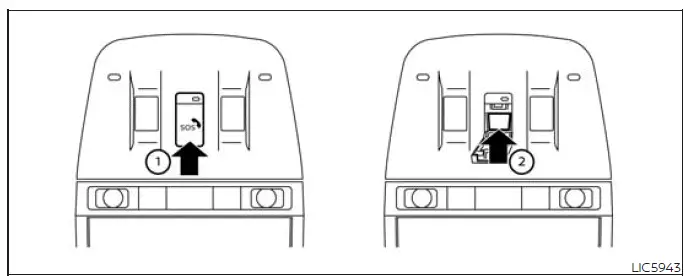
Making an emergency call
The Emergency Call (SOS) button 2 is located near the map light and is protected by a cover. In the Nissan Murano, this covered placement helps prevent accidental operation while still keeping the button accessible when emergency assistance is needed.
1. Place the ignition switch in the ON position.
2. Press the cover 1 to expose the Emergency Call (SOS) button 2.
3. Press the Emergency Call (SOS) button 2 to place an emergency call.
4. When the line is connected, speak clearly with the Response Specialist and describe the situation as accurately as possible.
If you need to cancel the emergency call, press and hold the Emergency Call (SOS) button for a few seconds. Cancel the call only when emergency assistance is not required.
NOTE:
- After the Emergency Call (SOS) button is pressed, it may take some time for the system to initiate the connection. The delay can vary depending on the technical environment and whether the TCU (Telematics Control Unit) is being used by other services.
- An indicator light on the Emergency Call (SOS) button shows the readiness of the emergency support system. If the indicator light is not illuminated, pressing the Emergency Call (SOS) button will not connect your vehicle to the Response Specialist. The indicator light blinks while the Nissan Murano is connected to the NissanConnect Services Response Center.
- Even when the indicator light is illuminated, connection to the NissanConnect Services Response Center may not always be possible. If this occurs during an emergency, contact police, medical services, or other authorities by another available method.
- To avoid disconnecting the line during an emergency call, keep the engine running if it is safe to do so.
See also:
Maximum load limits
Never allow the total trailer load to exceed the
value specified in the following Towing
Load/Specification Chart found later in this section.
The total trailer load equals trailer weight
plus i ...
Keys
Type A
Type B
Type C
1. Intelligent Key (2 sets)
2. Mechanical key
3. Key number plate (1 plate) ...
Mechanical key
To remove the mechanical key, release the lock
knob at the back of the key.
To install the mechanical key, firmly insert it into
the key until the lock knob returns to the lock
position.
Us ...