
Doors
Basic information
When the doors are locked using any of the methods described below, they cannot be opened with either the interior or exterior door handles. The appropriate door or all doors must first be unlocked before they can be opened. Understanding how each locking method operates will help ensure that the Nissan Murano remains secure while allowing occupants to enter or exit safely.
WARNING
- Always keep the doors locked while driving. Together with the proper use of seat belts, locked doors provide greater protection in the event of a collision by helping reduce the possibility of occupants being thrown from the vehicle. Locked doors also help prevent children or other passengers from unintentionally opening a door while the vehicle is moving and provide an additional level of protection against unauthorized entry.
- Before opening any door, carefully check the surrounding area for approaching vehicles, cyclists, motorcycles, pedestrians, and other road users. Open the door only when it is safe to do so and when it will not obstruct traffic.
- To reduce the risk of serious injury or death caused by unintended operation of the vehicle or its systems, including window entrapment or accidental activation of the door locks, never leave children, people who require assistance, or pets unattended inside the vehicle. The passenger compartment of a closed vehicle can heat up very quickly on a warm day, even when the outside temperature does not appear extreme, creating a significant risk of heat-related injury or death.
Locking with key
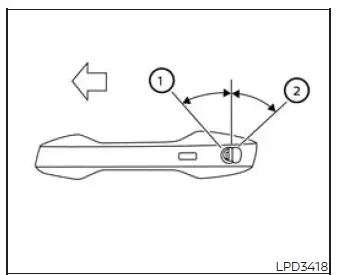
To lock the door with the mechanical key, insert the key into the door lock cylinder and turn it toward the rear
of the vehicle, as indicated by position 2. This action locks only the corresponding door and does not activate
the vehicle security system. To arm the security system after locking the door, press the
 button on the Intelligent Key.
To unlock the door with the mechanical key, turn the key toward the front of the vehicle, as indicated by position 1. This procedure unlocks only the corresponding door and does not disarm the security system. If the security system is armed, use the Intelligent Key as required to disarm it before entering or operating the Nissan Murano.
Locking with inside lock knob
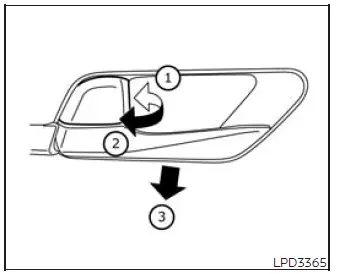
Inside lock
To lock a door without using the key, move the inside lock knob to the locked position 1, and then close the door. Before closing the door, verify that the Intelligent Key has not been left inside the passenger compartment.
To unlock a door from inside the vehicle without using the key, move the inside lock knob to the unlocked position 2. The door can then be opened normally with the interior handle.
To unlock and open either front door without moving the lock knob manually, pull the interior door handle 3 once to unlock the door, and pull it a second time to open the door. This two-step action allows the front doors to be released directly from the handle when they are locked.
Locking with power door lock switch
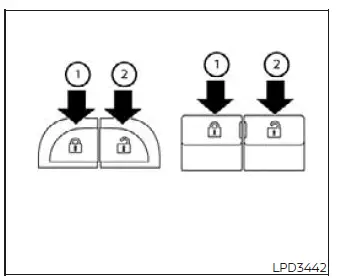
Basic information
To lock all doors without using a key, press the power door lock switch on either the driver's door or the front passenger's door to the lock position 1. All doors will lock at the same time. Before using the switch and closing the door, make certain that the Intelligent Key is not left inside the vehicle.
To unlock all doors without using a key, press the power door lock switch on the driver's or front passenger's side to the unlock position 2. This releases the door locks throughout the vehicle so the doors can be opened from the appropriate handles.
Lockout protection
When the power door lock switch is pressed to the lock position while any door is open, all doors will initially lock. However, if the Intelligent Key is detected inside the vehicle while a door remains open, all doors will automatically unlock after that door is closed, and a warning chime will sound.
This lockout-protection function is designed to reduce the possibility of accidentally leaving the Intelligent Key locked inside the Nissan Murano. Even with this feature, always confirm that the key is in your possession before closing the final open door.
Automatic door locks
- All doors lock automatically when the vehicle reaches a speed of approximately 15 mph (24 km/h). This function helps keep the doors secured once the vehicle is being driven.
- All doors unlock automatically when the transmission is shifted into the P (Park) position or when the ignition switch is placed in the OFF position. The exact unlocking action depends on the option selected in the "Vehicle Settings" menu.
NOTE: The operating preference for the Auto Door Unlock feature can be changed through the "Vehicle Settings" menu in the vehicle information display. Select the setting that best matches the driver's preferred door-unlocking behavior.
Child safety rear door lock
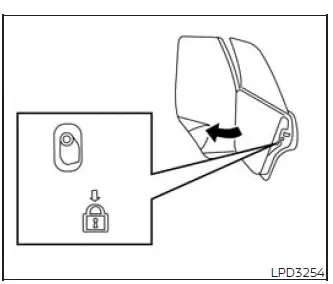
The child safety rear door locks help prevent the rear doors from being opened unintentionally from inside the vehicle. They are particularly useful when small children are seated in the rear passenger area.
The child safety lock levers are located on the outer edge of each rear door and are accessible when the corresponding door is open. Each rear door must be adjusted separately, so check both levers when child safety locking is required.
When a lever is placed in the LOCK position, that rear door cannot be opened with the interior door handle and can be opened only from outside the vehicle. Before driving with children in the rear seats, close each door securely and verify that the selected child safety lock is operating as intended.
See also:
Bluetooth® Hands-Free Phone System with Navigation System (if so equipped)
WARNING
● Use a phone after stopping your vehicle
in a safe location. If you have to use a
phone while driving, exercise extreme
caution at all times so full attention may
be given to vehic ...
Underbody
In areas where road salt is used in winter, it is
necessary to clean the underbody regularly in
order to prevent dirt and salt from building up and
causing the acceleration of corrosion on the unde ...
Braking precautions
The brake system has two separate hydraulic
circuits. If one circuit malfunctions, you will still
have braking at two wheels.
Vacuum assisted brakes
The brake booster aids braking by using engin ...