
Motion-Activated Liftgate
Basic information
The liftgate can be opened or closed without using your hands by making a quick kicking motion beneath the center of the rear bumper. This feature is useful when approaching the Nissan Murano while carrying luggage, shopping bags, or other items.
For the Motion-Activated Liftgate to operate, the Intelligent Key must be carried within 47 in (120 cm) of the liftgate. The system must detect the key within this range before it can respond to the kicking motion.
NOTE: Tow hitches are available as accessories for this vehicle. If a tow hitch is installed, the Motion-Activated Liftgate electronic control unit (ECU) must be replaced with an ECU programmed with the appropriate towing logic. Without the correct ECU configuration, the Motion-Activated Liftgate may not operate properly.
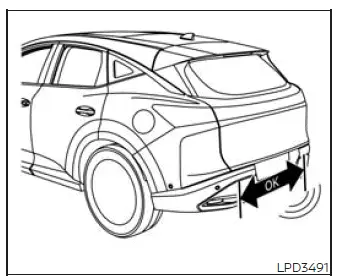
Activation zone
Proper operation technique
- Stand behind the vehicle and begin with a quick forward kicking motion directed beneath the center of the rear bumper.
- Move your foot straight forward under the bumper, and then immediately return it to the ground in one continuous movement.
- Keep the kicking motion straight, smooth, and consistent. Avoid sweeping your foot from side to side or holding it beneath the bumper.
- After completing the motion, step back from the vehicle and leave enough clear space for the liftgate to open or close safely.
- When the motion is detected correctly, three beeps will sound and the liftgate will begin moving within approximately two seconds after the kick.
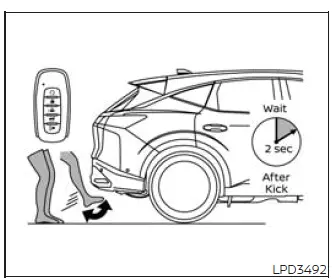
DO: Quick forward kick and return while
the key fob is within range
CAUTION Before making the kicking motion, establish a stable stance to reduce the risk of losing your balance. Use care around the exhaust system while moving your foot beneath the rear bumper, because nearby exhaust components may be hot and could cause injury.
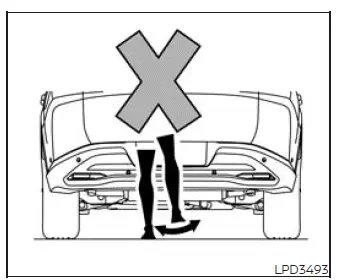
DO NOT: Swing foot side to side or
pause during kick
WARNING Take precautions to prevent the liftgate from opening or closing unintentionally. There may be situations in which automatic liftgate movement is unsafe or not desired.
Keep the Intelligent Key outside the liftgate detection range of 47 in (120 cm) whenever washing the Nissan Murano or performing work near the rear bumper. Remaining within range while moving around the activation zone could unintentionally trigger the liftgate.
CAUTION
- Parking close to radio towers, satellite communication equipment, or other strong radio-frequency sources may interfere with the system or prevent normal Motion-Activated Liftgate operation.
- Communication with the Intelligent Key may also be affected when the key fob is stored directly beside a cellular phone or an RF-enabled smart card. Separate these items if the liftgate does not respond normally.
See also:
Engine cooling system
Basic information
The engine cooling system in the Nissan Murano is factory-filled with a pre-diluted mixture consisting of 50%
Genuine NISSAN Long Life Antifreeze/Coolant (blue) and 50% water. ...
Manual operation
Fan speed control
Turn the fan speed control dial
to manually
control the fan speed.
Press the AUTO button to return to automatic
control of the fan speed.
Air recirculation
Press the ai ...
General maintenance
During the normal day-to-day operation of the
vehicle, general maintenance should be performed
regularly as prescribed in this section. If
you detect any unusual sounds, vibrations or
smells, be s ...