
How to park with predicted course lines
WARNING
- If tires of a different size are installed, the predicted course lines may no longer represent the vehicle's path accurately. Use direct observation and the mirrors when maneuvering.
- On snow-covered, icy, wet, or otherwise slippery surfaces, the vehicle may not follow the path indicated by the predicted course lines because the tires can slip or slide.
- If the battery has been disconnected or becomes discharged, the predicted course lines may temporarily
appear incorrectly. If this occurs, complete the following procedures:
- With the engine running, turn the steering wheel fully from one side to the other.
- Drive the vehicle along a straight road for more than 5 minutes.
- If the steering wheel is turned while the ignition switch is in the ACC position, the predicted course lines may not be displayed accurately.
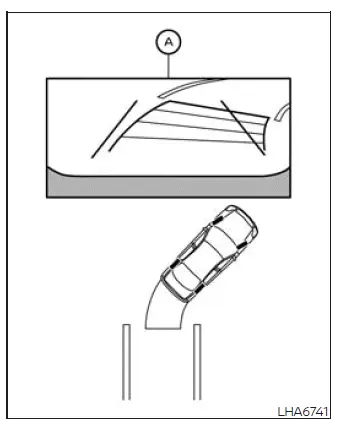
1. Before beginning the parking maneuver, visually inspect the intended space and the surrounding area. Confirm that there are no pedestrians, vehicles, curbs, posts, or other obstacles in the path of the Nissan Murano.
2. Select the R (Reverse) position. Rear camera image A will appear on the display, allowing the driver to view the area directly behind the vehicle.
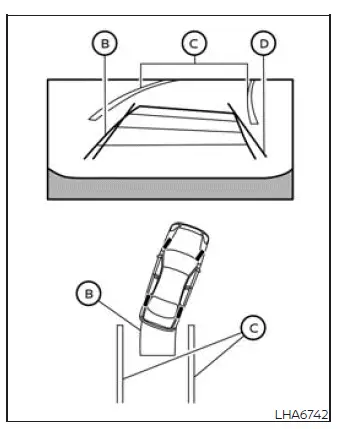
3. Reverse slowly while turning the steering wheel so that predicted course lines B move into parking space C. Continue checking the mirrors and looking around the vehicle as the displayed path changes.
4. Adjust the steering wheel gradually until vehicle width guide lines D are approximately parallel with parking space C. Use the predicted course lines as a reference while maintaining a safe distance from the boundaries of the space.
5. After the vehicle is positioned completely within the parking space, select P (Park) and apply the parking brake securely.
Adjusting the screen
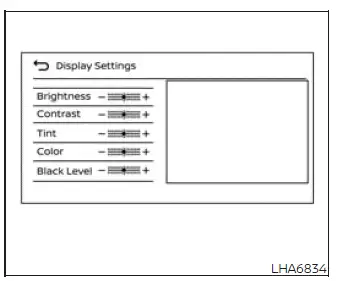
To adjust the RearView Monitor display while the vehicle is stationary and the transmission is in P (Park), complete the following steps:
1. From the main menu screen, touch the "Settings" key.
2. Touch the "Camera" key to open the available camera options.
3. Touch the "Display Settings" key.
4. Select the required display item, and then touch the "+" or "-" key on the touch-screen display to adjust it.
NOTE: Do not change RearView Monitor display settings while the vehicle is moving. Park the Nissan Murano in a safe location, select P (Park), and make sure the parking brake is firmly applied before making adjustments.
How to turn on and off predicted course lines
To switch the predicted course lines on or off while the transmission is in P (Park), perform the following procedure:
1. From the main menu screen, touch the "Settings" key.
2. Touch the "Camera" key.
3. Touch the "Predicted Course Lines" key to change the feature between its enabled and disabled settings. When the transmission is in R (Reverse), the predicted course lines can also be switched on or off by pressing the CAMERA button.
See also:
Underbody
In areas where road salt is used in winter, the
underbody must be cleaned regularly. This will
prevent dirt and salt from building up and
causing the acceleration of corrosion on the
underbody and ...
RearView Monitor (if so equipped)
When the shift selector is shifted into the R
(Reverse) position, the monitor display shows a
rearward view from the vehicle.
The system is designed as an aid to the driver in
situations such as ...
Hood
1. Pull the hood lock release handle 1
located below the instrument panel; the
hood will then spring up slightly.
2. Pull the lever2 up at the front of the hood
with your fingertips and raise th ...