
RearView Monitor system limitations
WARNING
The limitations of the RearView Monitor are described below. Failure to understand these restrictions or to operate the vehicle accordingly could result in a collision, serious injury, or death.
- The RearView Monitor cannot eliminate every blind spot and may not display all people, animals, vehicles, or objects located behind the Nissan Murano.
- Areas directly beneath the rear bumper and near its outer corners are outside the camera's viewing range. Small objects positioned below the bumper may not appear on the screen, and objects very close to the bumper or lying on the ground may also remain hidden.
- Because the rear camera uses a wide-angle lens, the apparent size and distance of objects shown on the display may differ from their actual position behind the vehicle.
- The camera image is displayed differently from the view provided by the interior and outside mirrors. Objects may appear visually reversed compared with their appearance in those mirrors.
- Treat all displayed guide lines as approximate references rather than exact boundaries. Their apparent relationship to the road can be affected by passenger load, fuel level, vehicle angle, road surface conditions, and the slope of the ground.
- Before reversing, make sure the liftgate is completely closed and securely latched. An open or improperly closed liftgate can interfere with the camera view and create an unsafe driving condition.
- Do not attach, place, or hang any object over the rearview camera. The camera is installed above the rear license plate and must remain unobstructed.
- When washing the vehicle with high-pressure water, do not direct the spray at or around the camera. Water entering the camera unit may cause condensation on the lens, improper operation, fire, or electric shock.
- Do not strike, push, or subject the camera to impact. It is a precision component, and damage may lead to system malfunction, fire, or electric shock.
The following conditions are normal operating limitations and do not necessarily indicate a RearView Monitor malfunction:
- In extremely high or low temperatures, the display image may become less clear and objects may be difficult to distinguish.
- When strong sunlight, headlights, or another bright light source shines directly into the camera, portions of the image may appear washed out or unclear.
- Vertical lines may appear across bright objects on the screen because of strong light reflected from the rear bumper.
- The displayed image may flicker when the vehicle is near fluorescent lighting.
- Colors shown by the RearView Monitor may differ slightly from the actual colors of surrounding objects.
- In dark environments, objects behind the Nissan Murano may appear unclear, poorly defined, or difficult to identify.
- A brief delay may occur when the system changes from one camera view or display mode to another.
- If dirt, water droplets, rain, ice, or snow collect on the camera lens, the image may become blurred or objects may not be displayed clearly. Clean the camera before relying on the monitor.
- Do not apply wax directly to the camera lens. If wax reaches the lens, remove it carefully with a clean cloth dampened with a diluted mild cleaning agent, and then dry the surface with a separate clean cloth.
System maintenance
CAUTION
- Do not clean the camera with alcohol, benzine, thinner, or other strong solvents. These substances may discolor or damage the camera housing and lens surface.
- Handle the camera carefully and do not scratch, strike, or otherwise damage it. Camera damage can reduce image quality and adversely affect the information shown on the monitor.
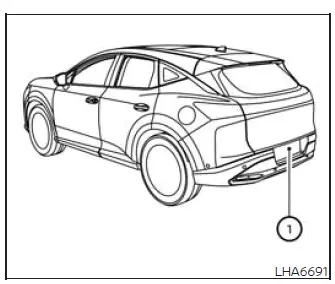
If dirt, rain, ice, or snow accumulates on camera 1, the RearView Monitor may no longer provide a clear image of the area behind the vehicle. Gently wipe the camera with a soft cloth dampened with a diluted mild cleaning agent, and then dry it with a clean, dry cloth. Avoid excessive pressure while cleaning the lens.
See also:
How to switch the display
With the ignition switch in the ON position, press
the CAMERA button or move the shift selector to
the R (Reverse) position to operate the Around
View Monitor.
The Around View Monitor displays d ...
CrossCabriolet models
1. Hood
2. Headlight and turn signal lights
— Switch operation
— Bulb replacement
3. Windshield wiper and washer
— Switch operation
— Blade replacement
— Window washer fluid
4. Sof ...
Difference between predicted and actual distances. How to park with predicted course lines
Difference between predicted and actual distances
Basic Information
The guidelines displayed on the monitor and their apparent positions on the ground are intended only as
approximate references. ...