
Difference between predicted and actual distances. How to park with predicted course lines
Difference between predicted and actual distances
Basic Information
The guidelines displayed on the monitor and their apparent positions on the ground are intended only as approximate references. Objects located on uphill or downhill surfaces, as well as objects that extend outward above the ground, may actually be positioned at distances that differ from how they appear in relation to the guide lines on the screen. The illustrations below show how changes in ground angle and object shape can affect the perceived distance. When there is any uncertainty, turn and look directly behind the Nissan Murano while reversing. When necessary, stop safely, shift to P (Park), apply the parking brake, and exit the vehicle to confirm the actual position and clearance of objects behind it.
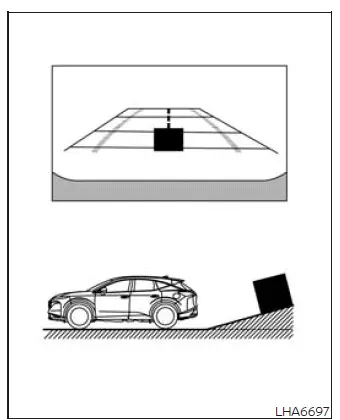
Backing up on a steep uphill
When the vehicle is backed uphill, the distance guide lines and vehicle width guide lines appear closer to the Nissan Murano than their actual positions on the ground. As a result, an object located farther up the slope is actually more distant than it appears on the monitor. Continue reversing slowly and confirm the available space through direct observation rather than relying only on the displayed image.
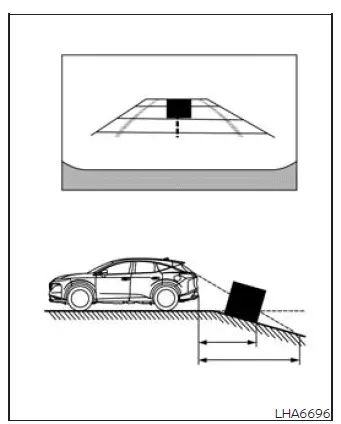
Backing up on a steep downhill
When backing down a steep hill, the distance guide lines and vehicle width guide lines appear farther from the vehicle than their actual positions. This means that an object on the downhill surface is physically closer than it appears on the monitor. Reduce speed and carefully check the surroundings because the displayed spacing may create the impression that more clearance is available than actually exists.
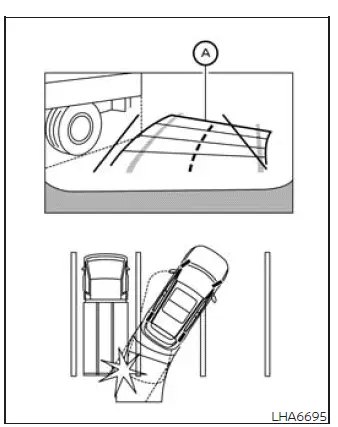
Backing up near a projecting object
The predicted course lines A may appear not to touch the object shown on the display. However, if part of the object extends outward above the ground and into the vehicle's actual reversing path, the Nissan Murano may still make contact with it. The guide lines represent an estimated path at ground level and may not account for raised or projecting portions of nearby obstacles.
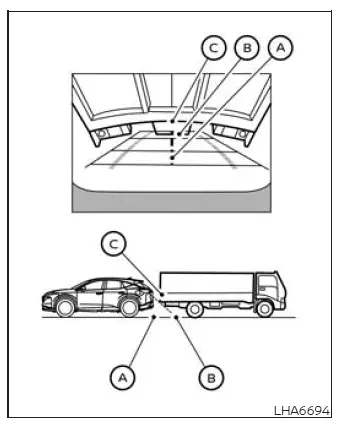
Backing up behind a projecting object
On the monitor, position C appears to be farther away than position B. In reality, however, position C is at the same distance from the vehicle as position A. If the object extends over the actual reversing path, the vehicle may strike the projecting section while backing toward position A, even though the displayed image appears to show sufficient clearance. Always consider the complete shape and height of an obstacle, not only the point where it meets the ground.
How to park with predicted course lines
WARNING
- If the original tires are replaced with tires of a different size, the predicted course lines may no longer represent the vehicle's path correctly.
- On a snow-covered, icy, or otherwise slippery road, the Nissan Murano may not follow the path indicated by the predicted course lines because the tires can lose traction or slide.
- If the battery is disconnected or becomes discharged, the predicted course lines may be displayed
incorrectly.
If this occurs, perform the following procedures:
- With the engine running, turn the steering wheel fully from one lock position to the other.
- Drive the vehicle in a straight line for more than 5 minutes.
- If the steering wheel is turned while the ignition switch is in the ACC position, the predicted course lines may not be displayed accurately.
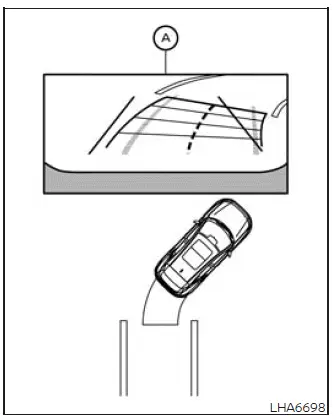
1. Before beginning the parking maneuver, visually inspect the parking space and the surrounding area. Confirm that the space is clear of pedestrians, vehicles, curbs, posts, and other obstacles that may not be fully visible on the monitor.
2. Move the shift position to R (Reverse). The rear view of the vehicle will then appear in screen area A, allowing the driver to observe the space behind the vehicle and use the displayed references during the maneuver.
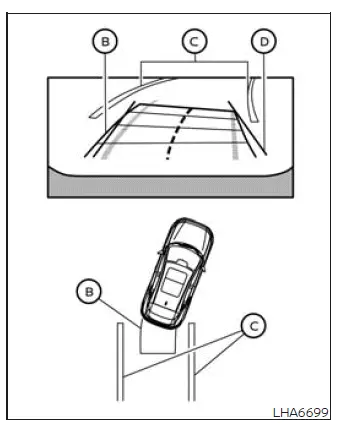
3. Back up slowly while adjusting the steering wheel so that the predicted course lines B move into parking space C. Continue checking both sides of the vehicle through the mirrors and direct observation as the Nissan Murano enters the space.
4. Turn the steering wheel as required until the vehicle width guide lines D appear parallel with parking space C. Use the predicted course lines to estimate the vehicle's path while making small, controlled steering adjustments.
5. After the vehicle is fully positioned within the parking space, stop completely, move the shift position to P (Park), and apply the parking brake.
See also:
Parking/parking on hills
WARNING
• Do not stop or park the
vehicle over
flammable materials such as dry
grass, waste paper or rags. They
may ignite and cause a fire.
• Safe parking procedures require
...
Tire Pressure Monitoring System (TPMS)
Basic Information
Check every tire, including the spare tire if one is provided, at least once a month while the tires are cold.
Inflate each tire to the pressure recommended by the vehicle manuf ...
Forward-facing child restraint installation using
LATCH (Hardtop models only)
Refer to all Warnings and Cautions in the “Child
safety” and “Child restraints” sections before
installing a child restraint.
Follow these steps to install a forward-facing
child restrai ...