
Intelligent Around View Monitor system operation
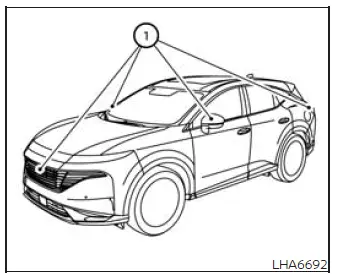
To generate its multiple viewing angles, the Intelligent Around View Monitor uses cameras installed in the front grille, beneath the outside mirrors, and above the rear license plate 1. Images from these cameras are processed and displayed to provide additional visual references around the Nissan Murano during supported low-speed maneuvers.
Basic Information
With the ignition switch in the ON position, select R (Reverse) using the shift button or press the CAMERA button to activate the Intelligent Around View Monitor. The view shown on the display depends on the selected shift position and the current camera mode.
When the camera system is first activated with the bird's-eye view displayed, a red icon will flash on the screen to indicate that the sonar system is active. If the CAMERA button is pressed while the transmission is in a position other than R (Reverse), the Intelligent Around View Monitor will remain displayed temporarily and automatically return to the previous screen after approximately 3 minutes.
Available views
Basic Information
WARNING
- Use the distance guide lines and vehicle width lines only as approximate references when the vehicle is on a level, paved surface. The distance shown on the monitor may differ from the actual clearance between the Nissan Murano and nearby objects.
- Treat the displayed guide lines and bird's-eye view as visual aids rather than exact representations. Their apparent positions can be affected by the number of occupants, cargo load, fuel level, vehicle angle, road condition, and road gradient.
- If tires of a different size are installed, the predicted course lines and bird's-eye image may no longer represent the vehicle's position or projected path accurately.
- When the vehicle is traveling or maneuvering uphill, objects shown on the monitor may be farther away than they appear. On a downhill surface, displayed objects may be closer to the vehicle than the image suggests.
- Objects shown in the rear camera view appear visually different from the way they are seen in the inside and outside mirrors. Do not rely on the display alone when determining direction or position.
- Use the mirrors and look directly around the vehicle to judge the actual distance to pedestrians, vehicles, curbs, and other obstacles.
- On snow-covered, icy, wet, or otherwise slippery roads, the Nissan Murano may not follow the path represented by the predicted course lines because the tires can slip or slide.
- The displayed vehicle width lines and predicted course lines are wider than the vehicle's actual width and projected path. Use them as conservative references rather than precise boundaries.
- The guide lines may appear slightly offset toward the right side of the screen because the rearview camera is not installed at the exact center of the rear of the vehicle.
Front and rear view
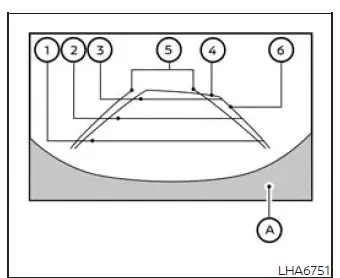
Front view
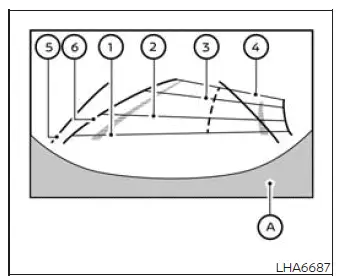
Rear view
The front and rear camera views display guide lines representing the approximate width of the vehicle and the estimated distance to surrounding objects in relation to vehicle body reference line A. These markings can assist with positioning, but the driver must continue checking the mirrors, windows, and area around the Nissan Murano throughout the maneuver.
Distance guide lines:
The distance guide lines indicate approximate distances measured from the vehicle body:
- Red line 1: approximately 1.5 ft (0.5 m).
- Blue line 2: approximately 3 ft (1 m).
- Blue line 3: approximately 7 ft (2 m).
- Blue line 4: approximately 10 ft (3 m), if so equipped.
Vehicle width guide lines 5:
These guide lines indicate the approximate width of the Nissan Murano while backing up. They can help the driver estimate the space required to maneuver, but they should not be treated as exact boundaries of the vehicle.
Predicted course lines 6:
These lines indicate the approximate path the vehicle is expected to follow during a maneuver. The predicted course lines appear on the monitor when the steering wheel is turned and change position according to the steering angle. As the steering wheel is turned farther, the lines curve accordingly to provide a visual reference for the anticipated direction of travel.
The front view will no longer be displayed when the vehicle speed exceeds 12 mph (20 km/h).
NOTE: When the monitor is displaying the front view and the steering wheel is turned approximately 90 degrees or less from the straight-ahead position, both the right and left predicted course lines 6 are displayed.
When the steering wheel is turned approximately 90 degrees or more, only the predicted course line on the side opposite the direction of the turn is displayed.
Front view
Rear view
Bird's-eye view
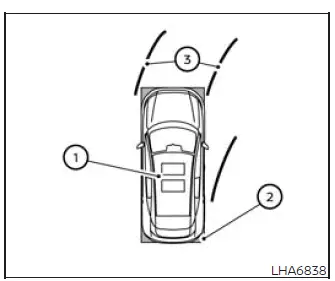
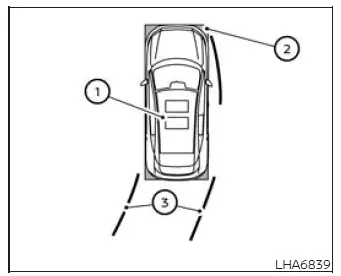
The bird's-eye view presents a simulated overhead image of the vehicle and its immediate surroundings. This perspective can help the driver confirm the Nissan Murano's position, orientation, and predicted path when approaching or aligning with a parking space.
The vehicle icon 1 represents the position of the vehicle within the displayed image. Because the bird's-eye view is created from multiple camera images, the apparent distance between the vehicle and surrounding objects may differ from the actual distance. Always verify the available space by checking through the windows and mirrors as well as the monitor.
Areas that cannot be captured by the cameras are identified by black sections 2 on the display.
The non-viewable area 2 is highlighted in yellow for several seconds after the bird's-eye view first appears. This yellow indication is displayed only the first time the bird's-eye view is shown after the ignition switch has been placed in the ON position.
While moving the vehicle forward or backward, the driver can use the display to estimate the direction and angle of the vehicle. The image is intended to support careful maneuvering and should be used together with direct observation of the surrounding area.
Predicted course lines 3 indicate the approximate path the vehicle is expected to follow based on the current steering-wheel position.
The predicted course lines appear on the monitor when the steering wheel is turned. They move and curve according to how far the steering wheel is rotated. The lines are not displayed while the steering wheel remains in the neutral, straight-ahead position.
When the monitor displays the front view and the steering wheel is turned approximately 90 degrees or less from the neutral position, two green predicted course lines are shown in front of the vehicle. These lines provide a visual estimate of the path the Nissan Murano may follow as it moves forward.
When the steering wheel is turned approximately 90 degrees or more, one green predicted course line is displayed in front of the vehicle, while the other predicted course line appears along the side of the vehicle. This arrangement reflects the sharper turning angle and helps illustrate the expected movement around the turn.
When the monitor displays the rear view, the predicted course lines appear behind the vehicle and indicate the approximate path the vehicle may follow while reversing.
WARNING
- Objects shown in the bird's-eye view may appear farther away than they actually are. Do not rely on the displayed image alone when judging clearance.
- Tall objects, including curbs and other vehicles, may appear misaligned, distorted, or may not be displayed correctly at the seams where the individual camera views are combined.
- Objects located above the cameras' viewing range cannot be shown on the monitor.
- The bird's-eye image may become misaligned if the position or angle of a camera changes.
- Lines or markings on the ground may appear offset or may not look straight where the camera images meet. This apparent misalignment can become more noticeable as the line extends farther away from the vehicle.
- The tire-angle display is an approximate visual reference and does not represent the exact physical angle of the tires.
Front passenger's side
Front-side view
Guiding lines
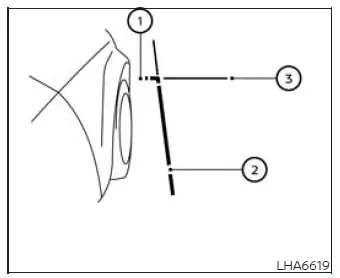
The monitor displays guiding lines that represent the approximate width and front edge of the vehicle. These visual references help the driver judge the Nissan Murano's position relative to curbs, parking-space markings, walls, and other nearby obstacles while maneuvering at low speed.
The front-of-vehicle line 1 indicates the approximate location of the front portion of the vehicle. Use this line as a general reference when approaching an object, because the image and displayed line do not provide an exact measurement of the remaining clearance.
The side-of-vehicle line 2 represents the approximate overall width of the vehicle, including the outside mirrors. It can assist the driver in estimating whether sufficient lateral space is available when passing close to an obstacle or positioning the vehicle within a confined area.
The extensions 3 of the front line 1 and side line 2 are displayed in blue. These extensions continue the visual references beyond the immediate outline of the vehicle and make it easier to evaluate the projected relationship between the Nissan Murano and its surroundings.
Front-wide view
Rear-wide view
Front-wide and rear-wide view
The front-wide and rear-wide views use the full monitor screen to show a broader area around the front or rear of the vehicle. This expanded perspective allows the driver to check blind corners on both the right and left sides, which may be especially helpful when visibility is restricted by parked vehicles, buildings, walls, vegetation, or other roadside obstructions. The rear-wide view displays an area of approximately 180 degrees, while the standard front and rear views each display an area of approximately 150 degrees.
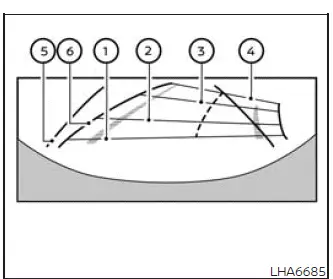
Distance guide lines
The distance guide lines indicate approximate distances from the vehicle body. They are intended to support visual judgment while maneuvering and should be used together with direct observation through the windows and mirrors:
- Red line 1: approximately 1.5 ft (0.5 m) from the vehicle body.
- Blue line 2: approximately 3 ft (1 m) from the vehicle body.
- Blue line 3: approximately 7 ft (2 m) from the vehicle body.
- Blue line 4: approximately 10 ft (3 m) from the vehicle body, if the vehicle is equipped with this indication.
Vehicle width guide lines 5
These lines indicate the approximate width of the vehicle while backing up. They can help the driver estimate the space required for the Nissan Murano to pass between nearby objects, but they should not be interpreted as exact physical boundaries.
Predicted course lines 6:
The predicted course lines indicate the approximate path the vehicle is expected to follow during a maneuver. They appear on the monitor when the steering wheel is turned and change position according to the steering angle. Turning the steering wheel farther causes the lines to curve more sharply, allowing the driver to visualize the anticipated direction of travel before and during movement.
The front-wide view is not displayed when the vehicle speed exceeds 12 mph (20 km/h). If the vehicle reaches a higher speed, the wide-angle image will no longer remain available on the monitor.
NOTE:
- When the rear-wide view is displayed and the steering wheel is turned approximately 90 degrees or less from the straight-ahead position, both the right and left predicted course lines 6 appear on the monitor. When the steering wheel is turned approximately 90 degrees or more, only the line on the side opposite the direction of the turn is displayed.
- Guide lines and predicted course lines are not shown while the front-wide view is displayed. The driver must therefore judge the vehicle's position by carefully observing the camera image, mirrors, windows, and surrounding area.
Saved Locations (if so equipped):
The system allows locations to be saved where the front-wide view should appear automatically. This feature can be useful at places where the driver regularly needs a broader view of areas that are difficult to see, such as intersections with restricted visibility, narrow exits, or other locations with obstructed blind corners.
After a location has been stored, the system can display the front-wide camera image when the vehicle approaches that point, helping the driver check traffic, pedestrians, and nearby obstacles on both sides. The image remains a visual aid and does not replace the need to stop when necessary and confirm that the path is clear before proceeding.
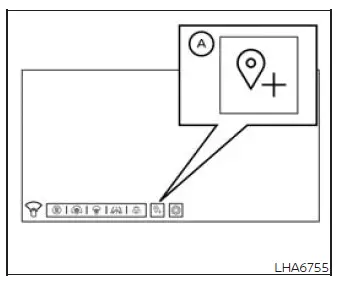
How to save the location
While the front-wide view is displayed on the monitor, touch the "A" key to save the current location. Use this function only when the vehicle is positioned at the point where the automatic front-wide view will be useful during future approaches.
Invisible hood view
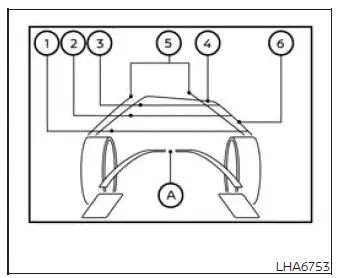
The invisible hood view creates the appearance of a virtually transparent vehicle body A, allowing the driver to see a generated image of the road surface beneath the front section of the Nissan Murano. This perspective can be useful when carefully aligning the front wheels with tracks at a car wash, positioning the vehicle in a confined area, or avoiding contact with the side of a curb while traveling at low speed.
NOTE: The displayed image of the road surface beneath the vehicle body is a composite created from previously captured front-camera images. It is not a live or direct view of the actual area underneath the vehicle, so the display should be used only as a visual reference while the driver continues to observe the surrounding area.
Distance guide lines
The distance guide lines indicate approximate distances from the vehicle body and help the driver estimate available space while maneuvering:
- Red line 1: approximately 1.5 ft (0.5 m) from the vehicle body.
- Blue line 2: approximately 3 ft (1 m) from the vehicle body.
- Blue line 3: approximately 7 ft (2 m) from the vehicle body.
- Blue line 4: approximately 10 ft (3 m) from the vehicle body, if so equipped.
Vehicle width guide lines 5
These lines represent the approximate width of the Nissan Murano and provide a visual reference for judging lateral clearance near curbs, lane markings, car-wash guides, and other nearby objects. They should not be interpreted as exact physical boundaries of the vehicle.
Predicted course lines 6:
The predicted course lines indicate the approximate path the vehicle is expected to follow during a maneuver. Their position and curvature change according to how far the steering wheel is turned, helping the driver anticipate the direction of travel before moving through a narrow or restricted area.
The invisible hood view is not available while the shift position is set to R (Reverse). A different camera perspective is used when the vehicle is backing up.
The invisible hood view will no longer be displayed when the vehicle speed exceeds 12 mph (20 km/h).
3D view
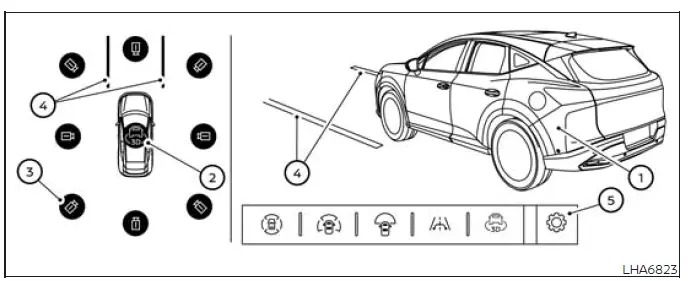
The 3D view presents a 360-degree visual representation of the area around the vehicle. This perspective helps the driver confirm the Nissan Murano's position, review nearby surroundings, and evaluate the predicted path toward a parking space or through a confined area.
When the rotation icon 2 is touched, the vehicle image 1 and the image of the surrounding area appear on the screen and rotate through 360 degrees. This rotating view allows the driver to examine the area around the vehicle from multiple camera perspectives.
If so equipped, the displayed vehicle image can also be rotated by swiping directly across the image. This provides another way to change the viewing angle and inspect different sides of the vehicle.
Eight different camera directions can be selected by touching the camera position icon 3. Each selectable direction provides a different perspective of the vehicle and its immediate surroundings.
When the vehicle speed exceeds 10 mph (16 km/h), selection is limited to the three cameras aimed in the direction of travel. Camera views facing other directions cannot be selected at that speed.
The predicted course lines 4 show the approximate path the vehicle is expected to follow based on the current steering input. These lines are intended to assist with positioning and maneuvering but do not replace direct observation of the area around the vehicle.
WARNING The apparent distance between objects shown in the 3D view may differ from their actual distance from the vehicle. Always confirm available clearance by checking the windows, mirrors, and surrounding area directly.
Some areas around the vehicle are outside the cameras' field of view, and objects located in those areas may not appear on the display.
Automatic 360º Moving:
The first time the CAMERA button is pressed after the ignition switch has been placed in the ON position, the vehicle image and surrounding-area image appear and automatically rotate through 360 degrees. This Auto 360º Moving sequence provides an initial visual overview of the area around the vehicle before the driver begins or continues a maneuver.
How to ON/OFF the Auto 360º Moving feature
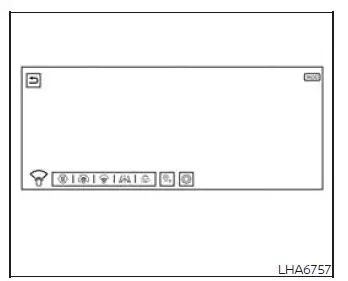
While the camera screen is displayed, touch "
 " 5 to open the
"Settings" menu. Select "Automatic 360º Moving," then enable or disable the feature according to the preferred
camera-screen operation.
" 5 to open the
"Settings" menu. Select "Automatic 360º Moving," then enable or disable the feature according to the preferred
camera-screen operation.
See also:
Phone settings
To set up the Bluetooth® Hands-Free Phone
System to your preferred settings, press the SETTING
button on the instrument panel and select
the “Phone” key on the display.
Edit Vehicle Phonebo ...
Conventional (fixed speed) cruise
control mode
Basic Information
NOTE: In conventional fixed-speed cruise control mode, ProPILOT Assist does not provide
approach warnings, automatic braking, vehicle-to-vehicle distance control, or Steering A ...
Pairing procedure
Up to 5 cellular phones can be registered.
1. Push the button on the
steering wheel.
The system announces the available commands.
2. Speak: “Connect Phone”. The system acknowledges
the ...