
Conventional (fixed speed) cruise control mode
Basic Information
NOTE: In conventional fixed-speed cruise control mode, ProPILOT Assist does not provide approach warnings, automatic braking, vehicle-to-vehicle distance control, or Steering Assist. The driver remains fully responsible for monitoring traffic, maintaining a safe following distance, steering, and applying the brakes whenever necessary.
This mode allows the Nissan Murano to maintain a driver-selected speed between 20 and 90 mph (32 and 144 km/h) without requiring continuous pressure on the accelerator pedal. Unlike Intelligent Cruise Control, conventional cruise control does not automatically adjust speed in response to vehicles traveling ahead.
WARNING
- In conventional fixed-speed cruise control mode, no warning chime sounds when your vehicle is too close to a vehicle ahead. The system does not detect the presence of a preceding vehicle and does not measure the distance between vehicles.
- Pay close attention to traffic and maintain a safe distance between the Nissan Murano and the vehicle ahead. Failure to monitor and adjust the following distance manually could result in a collision.
- Always check the ICC system display and confirm that conventional fixed-speed cruise control is the selected operating mode before relying on speed control.
- Do not use conventional fixed-speed cruise control under any of the following conditions:
- When road, traffic, or weather conditions make it difficult or unsafe to maintain a constant preset speed.
- In heavy traffic or when surrounding vehicles frequently accelerate, decelerate, or stop.
- On winding or hilly roads where frequent speed or steering adjustments may be required.
- On slippery roads affected by rain, snow, ice, standing water, or other conditions that reduce tire traction.
- In areas with strong or gusting winds that may affect vehicle stability or lane position.
- Using conventional cruise control under unsuitable conditions could cause loss of vehicle control and result in a collision, serious injury, or death.
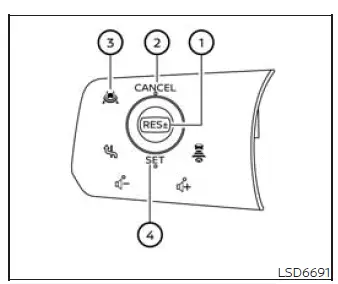
Conventional (fixed speed) cruise control switches
- RES+- switch: Resumes operation at the previously stored speed or increases the selected cruising speed incrementally.
- CANCEL switch: Cancels active cruise control and places the system in standby without deleting the stored speed.
- ProPILOT Assist switch: Turns the ProPILOT Assist system on or off and is also used to select conventional fixed-speed cruise control mode.
- SET switch: Stores the current vehicle speed as the desired cruising speed or reduces the selected speed incrementally.
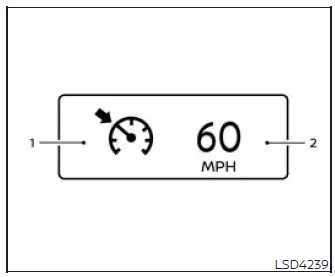
Conventional (fixed speed) cruise control mode display and indicators
The conventional cruise control display is located in the vehicle information display and communicates the current system status, stored speed, and any detected malfunction.
1. Cruise indicator: This indicator uses different colors to show the operating condition of the conventional Cruise Control system.
- Cruise control ON indicator (white): Cruise Control is switched on but remains in standby because a cruising speed has not been set or active control has been canceled.
- Cruise control SET indicator (green): A cruising speed has been stored and the system is actively maintaining that selected speed.
- Cruise control warning (yellow): A malfunction has been detected in the Cruise Control system, and normal operation may not be available.
2. Set vehicle speed indicator: This indicator displays the cruising speed currently stored by the driver. On Canadian models, the selected speed is shown in km/h.
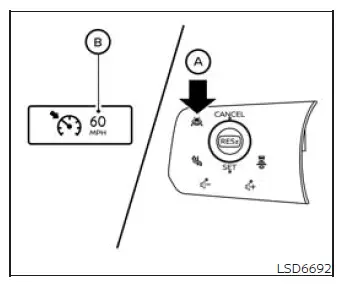
Operating conventional (fixed speed) cruise control mode
To switch on conventional fixed-speed cruise control mode, press and hold the ProPILOT Assist switch A for longer than approximately 1.5 seconds.
When the ProPILOT Assist switch is initially pressed, the ICC system display illuminates. After the switch is held for longer than approximately 1.5 seconds, the ICC display turns off and the cruise indicator B appears, confirming that conventional fixed-speed cruise control has been selected. The driver can then set the desired cruising speed. Pressing the ProPILOT Assist switch again turns the system completely off. The system also switches off automatically when the ignition switch is placed in the OFF position.
To use ICC again, briefly press and release the ProPILOT Assist switch to select vehicle-to-vehicle distance control mode. To return to conventional fixed-speed cruise control, press and hold the switch for longer than approximately 1.5 seconds before setting the desired speed.
CAUTION To prevent conventional cruise control or ICC from being activated unintentionally, switch off ProPILOT Assist whenever the system is not being used.
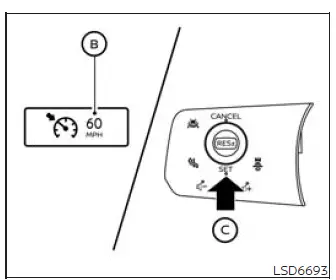
To set the cruising speed, accelerate the vehicle to the desired speed, press and release the SET C switch, and then remove your foot from the accelerator pedal. The cruise indicator changes to green and the set vehicle speed indicator illuminates, confirming that the Nissan Murano will attempt to maintain the stored speed.
- To pass another vehicle, press the accelerator pedal and control acceleration manually. After the pedal is released, the vehicle gradually returns to the previously selected cruising speed.
- The vehicle may be unable to maintain the stored speed while traveling up or down a steep hill.
If this occurs, use the accelerator or brake pedal as necessary to maintain a safe and appropriate vehicle speed.
To cancel the preset cruising speed, use any of the following methods:
1. Press the CANCEL switch. Active speed control is canceled, and the vehicle set speed indicator and cruise indicator change to gray to show that the system is in standby.
2. Lightly press the brake pedal. Cruise control is canceled, and both the set speed indicator and cruise indicator change to gray.
3. Press the ProPILOT Assist switch to turn the system off completely. The cruise indicator and vehicle set speed indicator will both disappear.
To reset the system at a higher cruising speed, use one of the following three methods:
1. Press the accelerator pedal until the vehicle reaches the desired higher speed, and then press and release the SET switch to store the new speed.
2. Press and hold the RES+- switch. Release the switch when the vehicle reaches the desired cruising speed.
3. Press and quickly release the RES+- switch. Each brief operation increases the stored speed by approximately 1 mph (1 km/h), allowing smaller adjustments.
To reset the system at a lower cruising speed, use one of the following three methods:
1. Lightly press the brake pedal and allow the vehicle to slow to the desired speed. Then press and release the SET switch to store the new cruising speed.
2. Press and hold the SET switch. Release the switch when the Nissan Murano slows to the desired speed.
3. Press and quickly release the SET switch. Each brief operation reduces the stored speed by approximately 1 mph (1 km/h).
System temporarily unavailable
A warning chime sounds and conventional fixed-speed cruise control is canceled automatically under any of the following conditions. The driver must immediately resume manual control of vehicle speed:
- When the shift position is moved out of D (Drive).
- When the electronic parking brake is applied.
- When the VDC system, including the traction control function, begins operating.
- When the VDC system is turned off.
- When one or more wheels lose traction or begin to slip.
- When vehicle speed decreases below approximately 20 mph (32 km/h).
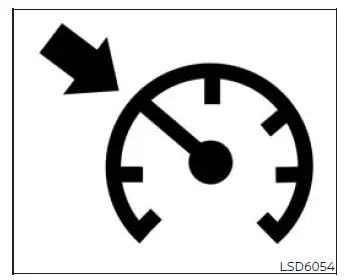
Warning
If the conventional cruise control system is not operating correctly, a warning chime sounds and the cruise indicator changes to yellow. The system may be unavailable until the condition is inspected and corrected.
Action to take:
If the cruise indicator changes to yellow, indicating a cruise control warning, park the Nissan Murano in a safe location away from traffic. Turn off the engine, restart it, resume driving when safe, and attempt to set the system again.
If the cruising speed still cannot be set or the yellow warning indicator remains illuminated, the Cruise Control system may be malfunctioning. Although the vehicle can normally still be driven without cruise control, have the system inspected. It is recommended that you visit a NISSAN dealer for this service.
See also:
Keys
Type A
Type B
Type C
1. Intelligent Key (2 sets)
2. Mechanical key
3. Key number plate (1 plate) ...
Control buttons
1. PHONE button
2. TALK /PHONE SEND
button ...
USB interface (models without Navigation System) (if so equipped)
Connecting a device to the USB input
jack
CAUTION
● Depending on size and shape of USB
device, the console lid may not fully
close. Do not force console lid closed
as this may damage USB ...