
Heater and air conditioner settings
Basic Information
Heater and air conditioner preferences can be adjusted directly from the
 Climate control screen. These options allow selected automatic climate
and comfort functions to be customized according to the driver's preferences.
Climate control screen. These options allow selected automatic climate
and comfort functions to be customized according to the driver's preferences.
While the climate control screen is displayed, touch the "
 " Settings key to open the available heater and air
conditioner configuration menu.
" Settings key to open the available heater and air
conditioner configuration menu.
The settings shown on the screen may vary according to the Nissan Murano model, installed equipment, and vehicle specifications. Functions that are not fitted to the vehicle will not appear in the menu.
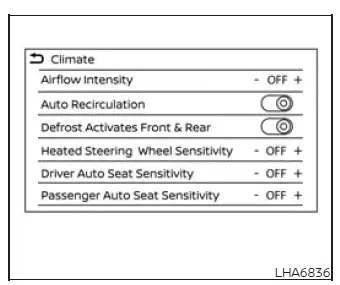
Available settings, if so equipped, include:
- Airflow Intensity
This setting controls the strength of the airflow used during automatic climate control operation. Touch the "+" or "-" key to select the preferred intensity level from 1 (low) to 3 (high). A higher setting provides stronger airflow while AUTO mode is regulating the passenger-compartment temperature. - Auto Recirculation
When this setting is ON and the AUTO button is selected, the air intake system changes to automatic intake control. The climate control system can then manage the recirculation status as part of automatic operation. When this setting is OFF, pressing the AUTO button retains the air intake selection previously chosen by the user instead of automatically changing to Auto intake. - Defrost Activates Front & Rear
When this function is enabled, pressing the Front defroster button on the control panel also
switches on the
Front defroster button on the control panel also
switches on the
 Rear window defroster automatically. This allows the front
windshield and rear window defrosting functions to operate together from a single control.
Rear window defroster automatically. This allows the front
windshield and rear window defrosting functions to operate together from a single control.
- Heated Steering Wheel Sensitivity
During automatic control operation, this setting changes the response level of the heated steering wheel from 1 (low) to 3 (high). Selecting a higher level increases the sensitivity of automatic heated steering wheel operation.When the automatic air conditioner is operating, the heated steering wheel will not be activated automatically while this setting is set to "OFF".
- Driver Auto Seat Sensitivity
In automatic control mode, this option adjusts the temperature-control sensitivity of the driver's climate-controlled seat or heated seat, if so equipped. The available sensitivity range is from 1 (low) to 3 (high), allowing the automatic comfort response for the driver's seat to be reduced or increased.
When the automatic air conditioner is in use, the driver's seat function will not activate automatically while this setting is set to "OFF". - Passenger Auto Seat Sensitivity
In automatic control mode, this option adjusts the temperature-control sensitivity of the front passenger's climate-controlled seat or heated seat, if so equipped. The sensitivity can be selected from 1 (low) to 3 (high) to customize how the passenger-seat comfort function responds during automatic climate operation.
When the automatic air conditioner is operating, the front passenger's seat function will not activate automatically while this setting is set to "OFF".
Operating tips
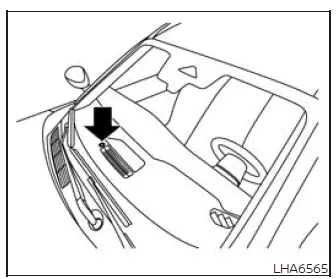
The sunload sensor is located on the instrument panel in the position shown. It measures the intensity of sunlight entering the passenger compartment and helps the automatic climate control system maintain a consistent selected temperature. Do not place objects on, over, or immediately around the sensor, because an obstruction may prevent it from detecting sunlight accurately and can affect climate control performance.
- When both the engine coolant temperature and outside air temperature are low, airflow from the foot outlets
may be delayed for up to 150 seconds.
This temporary delay is a normal operating characteristic and does not indicate a malfunction. Once the engine coolant has warmed sufficiently, air will begin flowing from the foot outlets and normal heater operation will resume.
- If the selected airflow mode does not appear to match the outlets from which air is being delivered, select
the
 mode. This allows the climate control
system to regulate airflow distribution according to current cabin conditions.
mode. This allows the climate control
system to regulate airflow distribution according to current cabin conditions.
- Immediately after changing the airflow mode, a brief amount of air may be felt from the foot outlets before the requested distribution is established. This momentary airflow is part of normal system operation and does not indicate a problem.
Servicing air conditioner
The air conditioning system in the Nissan Murano is charged with a refrigerant selected with environmental considerations in mind.
This refrigerant does not damage the earth's ozone layer when the system is serviced and handled correctly.
Specialized charging equipment and the correct lubricant are required when servicing the Nissan Murano air conditioning system. Using an unsuitable refrigerant, lubricant, or service procedure can cause severe damage to system components and may lead to improper operation. It is recommended that air conditioner inspection, charging, and repair be performed by a NISSAN dealer with the appropriate equipment and technical experience.
WARNING The air conditioning system contains refrigerant under high pressure. To reduce the risk of personal injury or system damage, servicing must be carried out only by an experienced technician using the correct tools and approved equipment.
See also:
Remote Engine Start (if so equipped)
The button will be on the NISSAN
Intelligent
Key® if the vehicle has remote engine start.
This feature allows the engine to start from outside
the vehicle.
The following features may be ...
Head restraints (1st row only)
WARNING
Head restraints supplement the other vehicle
safety systems. They may provide
additional protection against injury in certain
rear end collisions. Adjust the head
restraints properly, as ...
ProPILOT Assist mode indicators
Basic information
ProPILOT Assist can operate in several modes according to the current road, vehicle, system, and
driver-monitoring conditions. Each mode is identified by a specific indicator co ...