
Automatic engine shut-off
The automatic engine shut-off system turns off the engine after it has been left running for an extended period while the shift position remains in P (Park). This feature helps reduce unnecessary idling and prevents fuel from being consumed when the Nissan Murano has been left running unintentionally.
During the final 30 seconds before the engine is scheduled to shut off, a countdown notification will appear in the vehicle information display. This warning gives the driver an opportunity to allow the shutdown to proceed or temporarily disable the function for the current trip.
While the countdown message is displayed, use the appropriate button on the steering wheel to select one of the following options:
- Select "OK" to clear the message and allow the system to shut off the engine when the countdown ends. If no option is selected, the engine will also switch off automatically.
- Select "Disable" to prevent the automatic engine shut-off system from stopping the engine for the remainder of the current trip. The feature cannot be permanently deactivated and will become available again after the engine is restarted.
NOTE:
- The timer used to monitor prolonged idling will restart if the brake pedal or accelerator pedal is pressed. This action delays activation of the automatic engine shut-off system and begins a new monitoring period.
- The system automatically turns back on each time the engine is restarted, even if "Disable" was selected during the previous trip.
NISSAN Intelligent Key battery discharge
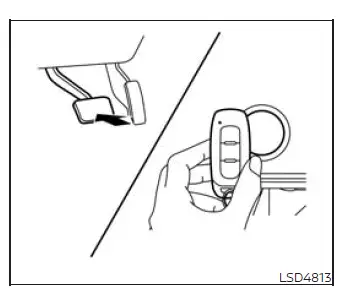
If the NISSAN Intelligent Key battery is discharged, or if surrounding environmental conditions interfere with normal Intelligent Key communication, the engine can still be started by following the procedure below. Complete each step in order so the Nissan Murano can recognize the Intelligent Key directly at the ignition switch.
1. Press the park button to place the shift position in P (Park). Confirm that the vehicle is securely in the parking position before continuing.
2. Firmly depress and hold the foot brake pedal.
3. Touch the ignition switch with the Intelligent Key in the position shown in the illustration. A chime will sound when the system recognizes the key.
After step 3 has been completed, pressing the ignition switch without depressing the brake pedal will change the ignition switch position to ON rather than starting the engine.
4. Within 10 seconds after the chime sounds, press the ignition switch while continuing to depress the brake pedal. The engine will start once the Intelligent Key has been successfully recognized.
NOTE:
- When the ignition switch is moved to the ON position or the engine is started using this procedure, the Intelligent Key battery discharge indicator may appear in the vehicle information display even though the Intelligent Key is inside the Nissan Murano. This indication is expected under these conditions and does not mean that the vehicle or Intelligent Key system is malfunctioning.
- To clear the Intelligent Key battery discharge indicator from the vehicle information display, touch the ignition switch with the Intelligent Key once again. This allows the Nissan Murano to detect the key directly and dismiss the warning when recognition is successful.
- If the Intelligent Key battery discharge indicator appears, replace the Intelligent Key battery as soon as possible. A weak battery may reduce the key's operating range or interfere with normal communication between the key and the vehicle.
NISSAN Vehicle Immobilizer System
The NISSAN Vehicle Immobilizer System prevents the engine from starting unless a key registered to the vehicle is used. This security feature verifies the key before allowing the Nissan Murano engine to start.
If the engine does not start with a registered key, nearby electronic devices may be interfering with key recognition. Interference can sometimes be caused by another registered key, an automated toll-road device, an automatic payment device, or another electronic item attached to the same key ring. In this situation, attempt to restart the engine by following the procedure below:
1. Leave the ignition switch in the ON position for approximately 5 seconds. This gives the immobilizer system time to attempt recognition of the registered key.
2. Move the ignition switch to the OFF or LOCK position, and then wait approximately 10 seconds before continuing.
3. Repeat steps 1 and 2 to allow the NISSAN Vehicle Immobilizer System another opportunity to recognize the registered key correctly.
4. Attempt to restart the engine while holding the device that may be causing the interference away from the registered key. Keep the suspected device separated from the key until the engine has started.
If the engine still does not start or the same condition occurs again, NISSAN recommends keeping the registered key on a separate key ring. Separating the Intelligent Key from toll-road transmitters, payment devices, other registered keys, and similar electronic equipment can help prevent signal interference during future starts.
Before starting the engine
- Make sure the area around the Nissan Murano is clear of people, animals, objects, and other potential obstacles before entering the vehicle or beginning to move.
- Check important fluid levels, including engine oil, engine coolant, brake fluid, and windshield-washer fluid, as frequently as practical and at least whenever the vehicle is refueled. Maintaining the correct levels helps support reliable operation and makes it easier to identify possible leaks or unusual fluid consumption.
- Make sure all windows and exterior lights are clean and unobstructed. Clear visibility through the glass and proper light output are essential for safe driving, particularly at night or in poor weather.
- Visually inspect the tires for damage, unusual wear, embedded objects, or other visible concerns. Also verify that each tire is inflated to the proper pressure before driving.
- Confirm that all doors are fully closed and securely latched before starting the engine or selecting a drive position.
- Position the driver's seat for comfortable access to the pedals, steering wheel, and controls, and adjust the head restraint or headrest to provide proper support. Passengers should also adjust their seating positions and head restraints as needed.
- Adjust the inside rearview mirror and both outside mirrors to provide a clear view behind and alongside the vehicle while minimizing blind areas.
- Fasten your seat belt correctly and make sure every passenger does the same before the Nissan Murano begins moving.
- Place the ignition switch in the ON position and verify that the warning lights operate as expected. If a warning remains illuminated or an unfamiliar message appears, review the displayed information before driving.
See also:
Operating manual lift gate
To open the lift gate, unlock it and push the
opener switch A . Pull up the lift gate to open.
The lift gate can be unlocked by:
• pushing the unlock button on the
Intelligent Key twice.
• ...
Automatic Transmission (A/T)
Basic Information
WARNING
Do not press the accelerator pedal while shifting from P (Park) or N (Neutral) into R (Reverse), D
(Drive), or M (Manual shift mode). Keep the foot brake pedal f ...
Rise-up and build-up
The system gradually adjusts braking power during
normal braking to help provide an enhanced
brake feel. ...