
Automatic brake hold
Basic information
The automatic brake hold function maintains braking force after the Nissan Murano has come to a complete stop, allowing the driver to remove their foot from the brake pedal while waiting at a traffic light, intersection, or similar temporary stop. When the driver presses the accelerator pedal again, the function normally deactivates and releases the brakes so the vehicle can move forward. The current operating status of automatic brake hold is shown by the relevant indicators.
To use the automatic brake hold function, all of the following operating conditions must be met:
- The driver's seat belt must be securely fastened.
- The electronic parking brake must be released.
- The transmission must be in a position other than P (Park).
- The Nissan Murano must not be stopped on a steep hill.
WARNING
- The automatic brake hold function is not designed to keep the vehicle stationary on a steep hill or a slippery road surface. Never rely on this function under these conditions, because the vehicle may begin moving unexpectedly.
- A warning may appear in the vehicle information display instructing the driver to resume control by depressing the brake pedal. Respond immediately whenever such a message is displayed.
- If automatic brake hold is active but does not keep the vehicle completely stationary, depress the brake pedal firmly to stop and secure the vehicle. If the Nissan Murano begins moving because of road conditions or another external factor, a warning chime may sound and an automatic brake hold warning may appear.
- Deactivate the automatic brake hold function before using an automatic car wash, towing the vehicle, or operating the vehicle while it is overloaded. Leaving the function active in these situations may interfere with the required movement of the vehicle.
- When parking, entering or leaving the vehicle, or loading or unloading luggage, always place the transmission in P (Park) and apply the electronic parking brake. Automatic brake hold is intended only for temporary stops and must not be used as a parking brake. Failure to secure the vehicle correctly could allow it to move or roll away, causing serious personal injury or property damage.
- If any of the following conditions occur, the automatic brake hold function may be unavailable or
malfunctioning. Have the system inspected promptly. NISSAN recommends visiting a NISSAN dealer for this
service. Continuing to rely on the function under these conditions could allow the vehicle to move
unexpectedly and result in serious injury or property damage.
- A warning message related to the function appears in the vehicle information display.
- The indicator light on the automatic brake hold switch does not illuminate when the switch is pressed.
- The automatic brake hold function will not activate if the slip indicator light, electronic parking brake warning light, electronic parking brake indicator light, or master warning light is illuminated while the Chassis Control System Error warning message appears in the vehicle information display.
- Automatic brake hold applies sufficient braking force to keep the Nissan Murano stationary. In some situations, this braking force may remain applied even after the accelerator pedal is pressed. If this occurs, depress the brake pedal first and then turn off the automatic brake hold switch. This procedure will cancel the hold function and allow normal brake release.
- A mechanical or operating sound may be heard while the system applies or maintains the braking force required to keep the vehicle at a standstill. This sound is a normal part of automatic brake hold operation and does not indicate a malfunction.
How to activate/deactivate the automatic brake hold function
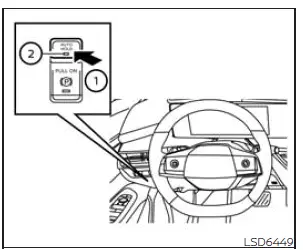
1. With the ignition switch in the ON position, press the automatic brake hold switch 1 to activate the function.
The indicator light on the automatic brake hold switch 2 will illuminate, confirming that the system has been turned on.
2. When the automatic brake hold function enters standby mode, the white automatic brake hold indicator light illuminates in the instrument display. The system is then ready to maintain braking force when the Nissan Murano comes to a complete stop under the required operating conditions.
To place the automatic brake hold function in standby and make it available for use, all of the following conditions must be satisfied:
- The driver's seat belt is securely fastened.
- The electronic parking brake is fully released.
- The transmission is in a position other than P (Park).
- The vehicle is not stopped on a steep hill.
NOTE: The automatic brake hold function remembers its most recently selected setting. Turning the ignition switch OFF does not automatically change the function's stored on or off state; it remains selected until the driver changes it.
How to use the automatic brake hold function
While the automatic brake hold function is activated, press the automatic brake hold switch to turn off the corresponding indicator light and deactivate the system. If the function is currently maintaining braking force, firmly depress and hold the brake pedal before pressing the switch. This transfers control of the brakes back to the driver before automatic holding is canceled.
WARNING Always depress and firmly hold the brake pedal when switching off the automatic brake hold function while braking force is being maintained. Deactivating the function releases the automatically applied braking force.
If the brake pedal is not held securely, the Nissan Murano may begin moving or roll away unexpectedly. Failure to keep the vehicle under control could result in a collision, serious personal injury, or property damage.
How to activate the automatic brake hold function
Basic information
Use the procedures described in this section whenever activating or operating the automatic brake hold function. Confirm the system's status by checking the indicator light before removing your foot from the brake pedal.
To maintain braking force automatically
With the automatic brake hold function activated and the white automatic brake hold indicator illuminated, depress the brake pedal and bring the vehicle to a complete stop. When the system begins maintaining the braking force, the indicator changes from white to green. The driver may then remove their foot from the brake pedal while the Nissan Murano remains stationary. The green automatic brake hold indicator stays illuminated for as long as the system continues to hold the brakes.
The green automatic brake hold indicator will not illuminate unless the brake pedal is depressed with enough force to bring the Nissan Murano to a complete stop and maintain the vehicle securely. The indicator may also remain off if the brake pedal is released too quickly immediately after stopping.
Before removing your foot from the brake pedal, always confirm that the green automatic brake hold indicator is illuminated. This verifies that the system has taken over and is actively maintaining the required braking force.
To start the vehicle from a standstill
With the transmission in a driving position other than P (Park) or N (Neutral), gently depress the accelerator pedal while the automatic brake hold function is maintaining braking force.
The braking force will be released automatically, allowing the Nissan Murano to move from the stopped position. Apply the accelerator smoothly and remain aware of surrounding traffic, pedestrians, and road conditions.
After the vehicle begins moving, the white automatic brake hold indicator illuminates, showing that the function has returned to standby and is ready to operate again at the next complete stop.
Parking
If the transmission is placed in P (Park) while braking force is being maintained by the automatic brake hold function, the electronic parking brake will apply automatically. Once the parking brake has secured the vehicle, the braking force provided by automatic brake hold will be released. The same transfer occurs if the electronic parking brake is applied while automatic brake hold is actively keeping the vehicle stationary.
NOTE:
Under any of the following conditions, the electronic parking brake will be applied automatically and the braking force maintained by the automatic brake hold function will be released. When this transfer occurs, the automatic brake hold indicator light turns off.
- The automatic brake hold function has maintained braking force continuously for 3 minutes or
longer.
- The transmission is placed in P (Park).
- The electronic parking brake is applied manually by the driver.
- The driver's seat belt is unfastened.
- The driver's door is opened.
- The ignition switch is placed in the OFF position.
- A malfunction is detected in the automatic brake hold function.
If the Nissan Murano comes to a stop but the braking force is not applied automatically, depress the brake pedal more firmly and continue holding it until the green automatic brake hold indicator illuminates. Do not release the pedal until the indicator confirms that the function is actively holding the vehicle.
When stopping on a slope, apply firm and steady pressure to the brake pedal until the green automatic brake hold indicator illuminates. Confirm that the vehicle remains fully stationary before removing your foot from the pedal.
See also:
Air bags, seat belts and child restraints
1. Supplemental front-impact air bags
2. Occupant classification sensor
(weight sensor)
3. Seat belts
4. Head Restraints
5. Roof-mounted curtain side-impact and
rollover supplemental air bag
...
Fuses
Basic information
If electrical equipment in the Nissan Murano stops operating, check whether the circuit is protected by an open
fuse. A fuse interrupts the circuit when an electrical ...
Passenger compartment
CAUTION
Never use a fuse of a higher or lower
amperage rating than specified on the
fuse box cover. This could damage the
electrical system or cause a fire.
If any electrical equipment does not ...