
Turning the Traffic Sign Recognition (TSR) system on and off
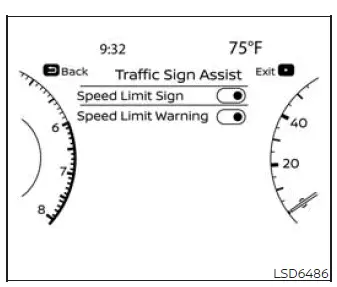
Follow the steps below to enable or disable the Traffic Sign Recognition system through the vehicle information display settings.
1. Press the  button repeatedly until "Settings" appears in
the vehicle information display, and then press the OK button. Use the scroll dial on the steering-wheel
controls to highlight "Driver Assistance," and press the OK button to open the menu.
button repeatedly until "Settings" appears in
the vehicle information display, and then press the OK button. Use the scroll dial on the steering-wheel
controls to highlight "Driver Assistance," and press the OK button to open the menu.
2. Select "Traffic Sign Assist," and then press the OK button to access the available TSR settings.
3. Select "Speed Limit Sign" and press the OK button to switch the speed-limit-sign display on or off.
4. Select "Speed Limit Warning" and press the OK button to enable or disable the corresponding warning function.
System temporarily unavailable
If the Nissan Murano is parked in direct sunlight under high-temperature conditions exceeding approximately 104°F (40°C) and is then started, the TSR system may deactivate automatically because the front camera temperature is too high. When this occurs, the "Unavailable Camera Temperature High" warning message appears in the vehicle information display.
Action to take:
Allow the passenger compartment and camera area to cool. When the interior temperature decreases sufficiently, the TSR system will resume operation automatically without requiring the driver to reactivate it.
System malfunction
If a malfunction is detected in the TSR system, the function will turn off automatically. The orange LDW indicator or a TSR system fault warning message will illuminate in the vehicle information display to notify the driver that traffic-sign information may no longer be available.
Action to take:
If the orange LDW indicator or TSR system fault warning message appears, move the Nissan Murano off the road and stop in a safe location. Turn off the engine, wait briefly, and restart it. If the indicator or fault message remains illuminated after restarting, have the system inspected. NISSAN recommends visiting a NISSAN dealer for this service.
System maintenance
The TSR system uses the same multi-sensing front camera unit as the Lane Departure Warning system. This camera is mounted on the windshield in front of the inside rearview mirror, where it can monitor road signs and lane markings ahead of the vehicle. Keep the windshield area in front of the camera clean and unobstructed so the system can operate as intended.
See also:
Passenger compartment
CAUTION
Never use a fuse of a higher or lower
amperage rating than specified on the
fuse box cover. This could damage the
electrical system or cause a fire.
If any electrical equipment does not ...
Flexible seating
Basic Information
WARNING
Never allow anyone to ride in the cargo area or on the rear seats when they are folded down.
In a collision, people riding in these areas without prop ...
Entry/exit function
This system is designed so that the driver’s seat
and automatic operation steering column will automatically
move when the shift selector is in the
P (Park) position. This allows the driver to ge ...