
Basic Information. I-LI system operation. How to enable/disable the I-LI system
Basic Information
WARNING
Failure to follow the warnings and operating instructions for the Intelligent Lane Intervention system could result in loss of vehicle control, serious injury, or death.
- The I-LI system does not continuously steer the vehicle and cannot prevent every unintended lane departure or loss-of-control situation. The driver remains responsible for staying alert, maintaining a safe course, keeping the Nissan Murano within the appropriate travel lane, and controlling the vehicle at all times.
- The I-LI system is intended primarily for use on well-developed freeways and highways with clearly visible lane markings or road edges. The camera may not recognize the lane boundaries accurately under certain road, weather, traffic, or driving conditions.
After the engine has been started, the I-LI system can be turned on using the ProPILOT Assist switch located on the steering wheel.
The I-LI system operates when the vehicle is traveling at approximately 37 mph (60 km/h) or faster and the camera can clearly recognize the lane markings or road edge. If these visual references are faded, obstructed, or otherwise difficult to detect, intervention may be delayed or unavailable.
If the vehicle begins moving away from the center of its travel lane, the system alerts the driver with an indicator and a vibration through the steering wheel. It may then briefly apply steering assistance toward the left or right to help guide the Nissan Murano back toward the center of the detected lane. The driver must continue holding the steering wheel and make any additional correction required by the road and traffic conditions.
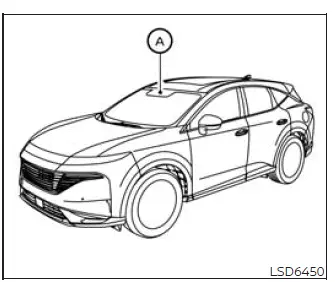
The I-LI system monitors the lane markings and road boundaries ahead using camera unit A, which is installed above the inside rearview mirror.
I-LI system operation
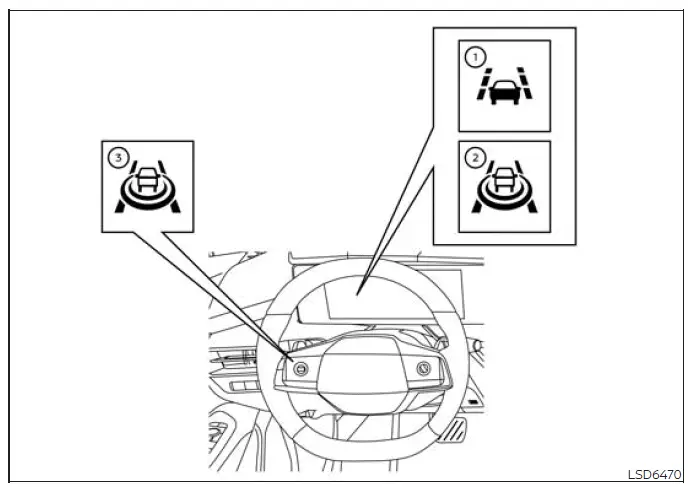
- Lane Departure Warning (LDW) indicator
- Intelligent Lane Intervention (I-LI) indicator
- ProPILOT Assist switch
The I-LI system becomes available above approximately 37 mph (60 km/h). When the vehicle approaches the left or right boundary of the detected travel lane, the steering wheel vibrates and LDW indicator 1 flashes orange on the instrument panel. In addition to warning the driver, the system may apply brief steering assistance toward the opposite direction to help return the vehicle closer to the center of the lane.
To turn on the I-LI system, start the engine and press ProPILOT Assist switch 3. I-LI indicator 2 on the instrument panel will illuminate to confirm that the function is enabled. Press the ProPILOT Assist switch again to turn the system off; the I-LI indicator will then go out.
The intensity of the steering-wheel vibration can be adjusted through the settings menu in the vehicle information display. Choose a setting that provides a noticeable warning without interfering with comfortable control of the Nissan Murano.
How to enable/disable the I-LI system
Basic Information
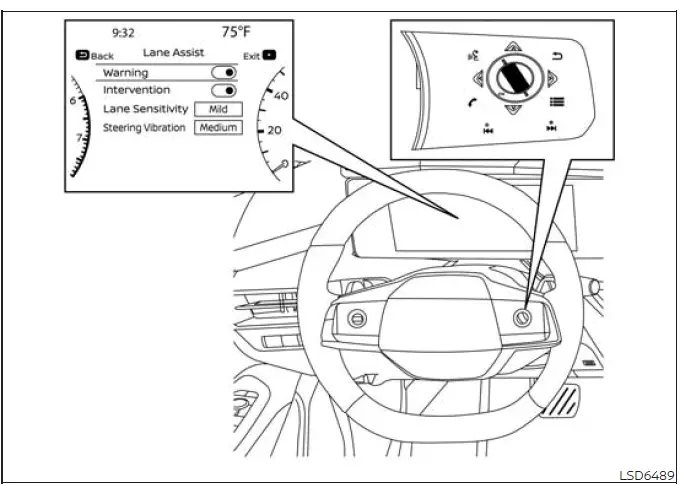
Follow the steps below to enable or disable the I-LI function through the vehicle information display and the ProPILOT Assist controls.
1. Press the  button repeatedly until "Settings" appears in
the vehicle information display, and then press the OK button. Use the
button repeatedly until "Settings" appears in
the vehicle information display, and then press the OK button. Use the  button to highlight "Driver
Assistance," and press the OK button to open the menu.
button to highlight "Driver
Assistance," and press the OK button to open the menu.
2. Select "Lane Assist," and then press the OK button to view the available lane-support settings.
3. Select "Intervention" and press the OK button to switch the I-LI function on or off.
4. Press the ProPILOT Assist switch to activate or deactivate the system during vehicle operation. Confirm the current status by checking the I-LI indicator in the instrument panel.
NOTE:
- Turning on ProPILOT Assist activates the I-LI and I-BSI systems at the same time. If I-LI has been switched off through the settings menu, it will automatically become active whenever the Steering Assist system is operating.
- The Nissan Murano retains the selected I-LI setting after the engine is restarted. The current preference remains stored until it is changed through the vehicle information display.
Setting lane sensitivity
Lane sensitivity can be adjusted through the "Settings" menu in the vehicle information display. This setting changes how the lane-support system responds as the vehicle approaches a detected lane boundary.
1. Press the  button repeatedly until "Settings"
appears in the vehicle information display.
button repeatedly until "Settings"
appears in the vehicle information display.
Use the scroll dial to highlight "Driver Assistance," and then press the OK button.
2. Select "Lane Assist," and press the OK button to open the lane-assistance options.
3. Select "Lane Sensitivity," and choose "Strong," "Normal," or "Mild" according to the preferred response level.
NOTE: The selected lane-sensitivity setting is retained after the engine is restarted and will remain active until the driver chooses a different level.
See also:
Emission control system warranty
Your NISSAN vehicle is covered by the following
emission warranties:
For USA
1. Emission Defects Warranty
2. Emissions Performance Warranty
Details of this warranty may be found with other
vehic ...
When operating the top
WARNING
Keep hands and other parts of the body
away from moving parts such as the
top, storage lid, inner flap A and
power windows.
CAUTION
• Keep all parts of the top linkage
clear ...
Waxing
Regular waxing protects the paint surface and
helps retain new vehicle appearance. Polishing is
recommended to remove built-up wax residue
and to avoid a weathered appearance before
re-applying wa ...