
I-BSI system operation
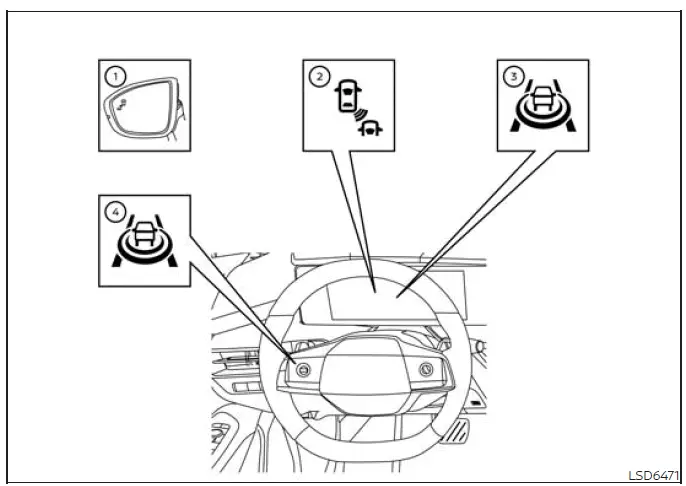
- Side BSW/RCTA indicator light
- BSW indicator
- Intelligent Blind Spot Intervention (I-BSI) indicator
- ProPILOT Assist switch
The I-BSI system operates when the vehicle is traveling above approximately 37 mph (60 km/h). Below this speed, the intervention function is not active.
If either radar sensor detects another vehicle within its detection zone, the corresponding side BSW/RCTA indicator light 1 illuminates. The illuminated indicator provides a visual warning that a vehicle is present in the monitored area beside or behind the vehicle.
If the turn signal is then activated toward the side where a vehicle has been detected, the system sounds a chime twice, and both the side BSW/RCTA indicator light and the BSW indicator light 2 flash. The side BSW/RCTA indicator continues flashing until the detected vehicle leaves the detection zone. Its brightness is adjusted automatically according to the surrounding ambient light so that the warning remains visible under different lighting conditions.
If the I-BSI system is ON and the Nissan Murano approaches a lane marker while another vehicle remains in the corresponding detection zone, the system sounds a chime three times. At the same time, the side BSW/RCTA indicator light and the BSW indicator light 2 flash. The system then applies brief steering assistance to the left or right, as appropriate, to help the driver return the vehicle toward the center of the current lane. This warning and steering assistance can operate whether or not the turn signal is being used.
NOTE:
- The I-BSI warning and steering assistance will activate only when the side BSW/RCTA indicator light is already illuminated as the vehicle approaches a lane marker. If another vehicle enters the detection zone only after your vehicle has crossed the lane marker, the I-BSI warning and intervention will not be activated.
- When the vehicle approaches a lane marker, the I-BSI system will typically activate before the Intelligent Lane Intervention (I-LI) system.
To turn on the I-BSI system, start the engine and press the ProPILOT Assist switch on the steering wheel. The I-BSI indicator illuminates to confirm that the system is enabled. Press the ProPILOT Assist switch again to turn the I-BSI system off.
When the system is switched off, the I-BSI indicator also turns off, confirming that the intervention function is no longer active.
How to enable/disable the I-BSI system
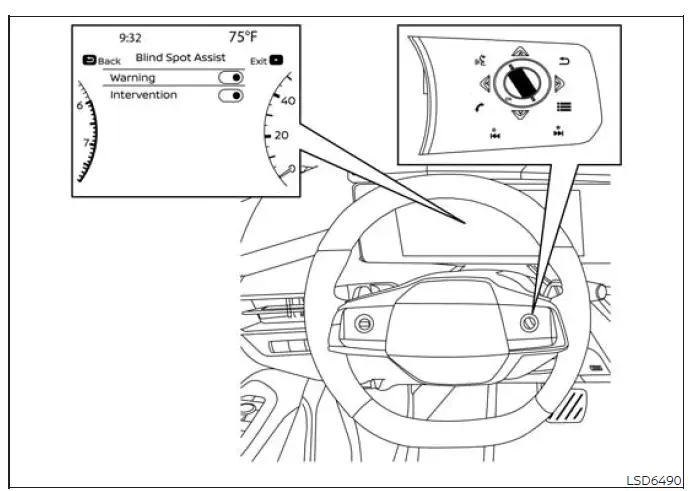
Use the following steps to enable or disable the I-BSI system through the vehicle information display:
1. Press the
 button repeatedly until "Settings" appears in the
vehicle information display.
button repeatedly until "Settings" appears in the
vehicle information display.
Use the scroll dial to highlight "Driver Assistance," and then press the OK button to open the selected menu.
2. Select "Blind Spot Assist," and press the OK button to access the available blind-spot assistance settings.
3. Select "Intervention," and use the OK button to switch the I-BSI function on or off.
4. Press the ProPILOT Assist switch to activate or deactivate the system during vehicle operation.
NOTE:
- Turning on ProPILOT Assist also turns on the I-BSI and I-LI systems at the same time. Enabling the I-BSI system also activates the Blind Spot Warning (BSW) system.
- When the system is enabled or disabled through the settings menu, the current selection is retained even after the engine is turned off and restarted.
See also:
Automatic operation
Cooling and/or dehumidified heating
(AUTO)
This mode may be used all year round. The
system works automatically to control the inside
temperature, air flow distribution and fan speed
after the pr ...
Trunk release power cancel switch
When the switch located inside the glove box is
in the OFF position A , the power to the trunk
lid will be canceled and the trunk lid cannot be
opened by the trunk lid release switch, the trunk
...
Cruise control operations
1. ACCEL/RES switch
2. COAST/SET switch
3. CANCEL switch
4. MAIN (ON·OFF) switch
The cruise control allows driving at a speed
between 25 to 90 MPH (40 to 144 km/h)
without keeping your foot o ...