
Basic Information. RCTA system operation
Basic Information
WARNING Failure to follow the warnings and instructions for the correct use of the Rear Cross Traffic Alert (RCTA) system could result in a collision, serious injury, or death.
- The RCTA system does not replace proper reversing procedures and is not designed to prevent contact with vehicles, people, or objects. Before backing out of a parking space, always check the side and rearview mirrors, turn your head, and look in the direction the Nissan Murano will move. Reverse slowly and never rely solely on the RCTA system to determine whether the path is clear.
The RCTA system assists the driver when backing out of a parking space. While the vehicle is moving in reverse, the system is designed to monitor for vehicles approaching from the left or right. If approaching cross traffic is detected, the system provides visual and audible warnings to help draw the driver's attention to the potential hazard.
RCTA system operation
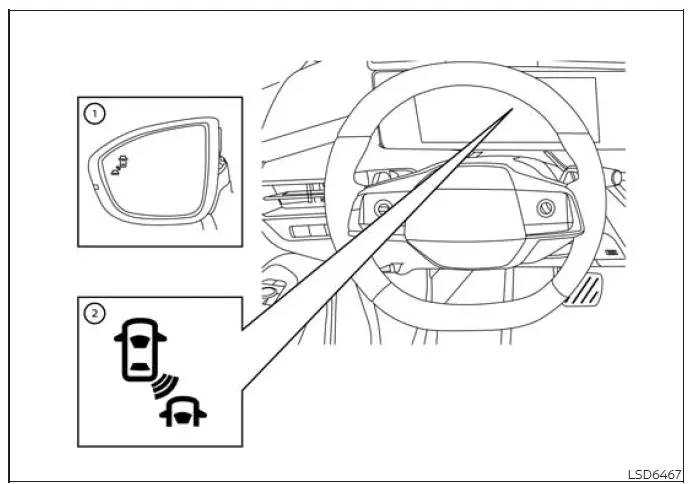
- Side BSW/RCTA indicator light
- BSW indicator
The RCTA system can alert the driver to an approaching vehicle while the Nissan Murano is backing out of a parking space. The warning is intended to supplement direct observation of the surrounding area rather than replace it.
When the shift position is in R (Reverse) and the vehicle is traveling at less than approximately 5 mph (8 km/h), the RCTA system is operational and monitors approaching cross traffic behind the vehicle.
If the radar sensors detect a vehicle approaching from either side, the system sounds a chime once. The side BSW/RCTA indicator light also flashes on the same side from which the detected vehicle is approaching, helping the driver identify the direction of the potential hazard.
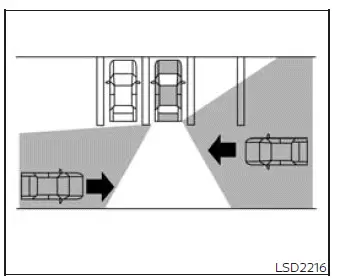
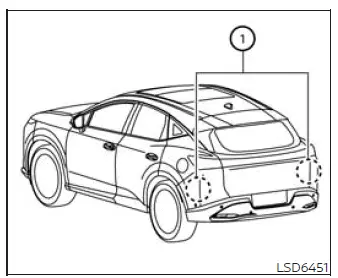
The RCTA system uses radar sensors 1 installed on both sides near the rear bumper. These sensors monitor the area behind the vehicle for moving traffic approaching from either direction.
The radar sensors 1 can detect an approaching vehicle from a distance of up to approximately 66 ft. (20 m), although actual detection may vary according to the surrounding conditions and the movement of the other vehicle.
How to enable/disable the RCTA system
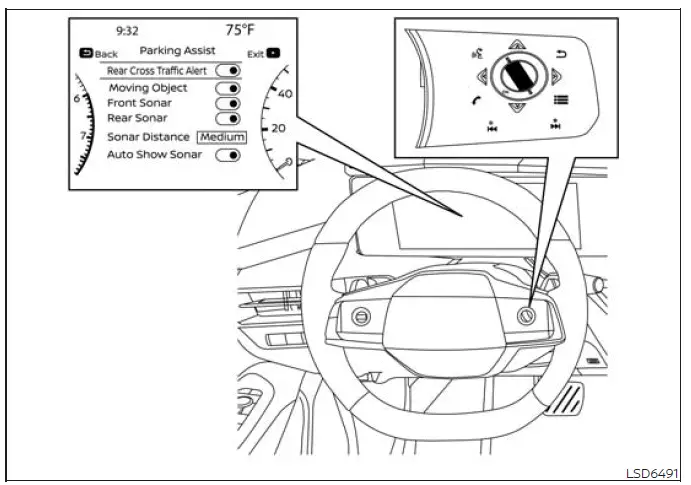
Use the following steps to enable or disable the RCTA system through the vehicle information display:
1. Press the
 button until "Settings" appears in the vehicle
information display, and then press the OK button. Use the scroll dial to highlight "Driver Assistance," and
press the OK button to open the selected menu.
button until "Settings" appears in the vehicle
information display, and then press the OK button. Use the scroll dial to highlight "Driver Assistance," and
press the OK button to open the selected menu.
2. Select "Parking Assist," and press the OK button to access the available parking assistance settings.
3. Select "Rear Cross Traffic Alert," and press the OK button to switch the system on or off.
NOTE:
- When the RCTA system is enabled or disabled through the settings menu, the selected setting is retained even after the engine is turned off and restarted.
See also:
Seats
WARNING
• Do
not ride in a moving vehicle
when the seatback is reclined. This
can be dangerous. The shoulder belt
will not be against your body. In an
accident, you could be thrown into i ...
Headlight control switch
Basic Information
Type A (if so equipped)
Type B (if so equipped)
Lighting
Rotate the switch to the position, and the front parking, tail, license plate, and
instrument panel lights w ...
Operating the HomeLink® universal transceiver
The HomeLink® Universal Transceiver (once
programmed) may now be used to activate the
garage door, etc. To operate, simply press the
appropriate programmed HomeLink® Universal
Transceiver button ...