
Overview
ProPILOT Assist is a hands-on driver-assistance system intended for use on limited-access expressways and is not designed for city streets, rural roads, or other unsuitable driving environments. Depending on the equipment installed, the system can help keep the Nissan Murano near the center of its lane while maintaining a preset distance from a vehicle traveling ahead in the same lane. Two enhanced levels of ProPILOT Assist are available, each adding specific functions to the core system:
ProPILOT Assist:
- Intelligent Cruise Control (ICC), which assists with maintaining the selected speed and following distance.
- Steering Assist, which provides steering support to help keep the vehicle near the center of a clearly marked lane.
ProPILOT Assist 1.1 (if so equipped):
- Speed Adjust by Route, which supports speed adjustments based on available route information.
- Speed Limit Assist, which provides assistance related to detected or available speed-limit information.
- Extended stop; see "Intelligent Cruise Control (ICC)" for operating details and applicable limitations.
ProPILOT Assist 2.1 (if so equipped):
- Steering Assist with HD map data, a feature available specifically with ProPILOT Assist 2.1.
- Lane Change Assist, which can support the driver during an intended lane change under appropriate operating conditions.
- Passing Assist, which can provide assistance when passing another vehicle under suitable road and traffic conditions.
NOTE: A subscription is required to access and use ProPILOT Assist 2.1 features.
To determine if your vehicle is equipped:
A Nissan Murano equipped with ProPILOT Assist 1.1 will have a steering wheel similar to the one shown in the following image and only one roof-mounted antenna:
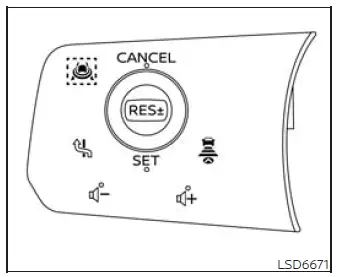
NOTE: ProPILOT Assist 1.1 is available only on vehicles equipped with an in-vehicle Map locator system.
A vehicle equipped with ProPILOT Assist 2.1 will have a steering wheel similar to the one shown below and two roof-mounted antennas. The antenna on the left side is the GNSS antenna:
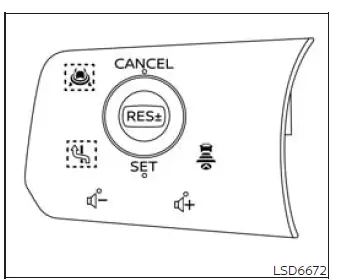
NOTE: It is important to identify which ProPILOT Assist version and related functions are installed on your vehicle, because some information, controls, operating procedures, and limitations described in this section may not apply to every model or equipment configuration.
WARNING The following warnings apply to the ProPILOT Assist suite of systems, including ProPILOT Assist 1.1, ProPILOT Assist 2.1, Intelligent Cruise Control (ICC), Steering Assist, Lane Change Assist, Passing Assist, the Driver Monitoring System, and conventional fixed-speed cruise control. These functions are collectively referred to below as the "ProPILOT Assist systems." All systems and features are applicable only if equipped.
- Failure to follow the warnings, limitations, and operating instructions for the applicable ProPILOT Assist systems could result in loss of vehicle control, a collision, serious injury, or death.
- Always drive carefully, remain attentive, and monitor the road when using any ProPILOT Assist function.
Read and understand the Owner's Manual thoroughly before operating the ProPILOT Assist systems.
To reduce the risk of serious injury or death, never rely on these systems to prevent a collision or control the vehicle's speed during an emergency. The driver must be prepared to steer, brake, or accelerate whenever necessary.
- Use the ProPILOT Assist systems only under road, traffic, visibility, and weather conditions appropriate for their operation. Deactivate the applicable function whenever conditions make safe or reliable assistance uncertain.
- The ProPILOT Assist systems are intended for use on limited-access freeways and expressways. They are not designed for city driving, local streets, intersections, or other roads where traffic patterns and roadway conditions may change frequently.
- The ProPILOT Assist systems are not autonomous or self-driving technologies. Within the operating limits described in this manual, they assist the driver with specific steering, speed-control, following-distance, and lane-change activities.
- The ProPILOT Assist systems do not replace correct driving procedures and cannot compensate for careless,
distracted, inattentive, or absent-minded driving.
Regardless of which function is active, the driver remains responsible for staying alert, observing surrounding traffic, operating the Nissan Murano safely, and maintaining control at all times. Failure to steer or apply the brakes when necessary could result in a serious collision.
- The ProPILOT Assist systems are driver-assistance functions only. Unless specifically described otherwise, they should not be treated as collision-warning or collision-avoidance devices.
- All ProPILOT Assist functions have detection and operating limitations. Never depend exclusively on these systems, because they may not function correctly or remain available under every road, traffic, weather, visibility, or driving condition.
- Never unfasten your seat belt while using ProPILOT Assist. Unfastening the driver's seat belt automatically cancels the ProPILOT Assist systems and requires the driver to assume full manual control immediately.
- When using the ProPILOT Assist systems, always observe posted speed limits and adjust the selected speed to suit current road, traffic, visibility, and weather conditions. Never set a speed above the applicable legal limit.
- When the accelerator pedal is depressed, the ProPILOT Assist systems will not provide automatic braking and/or the approach warning. The driver must control the vehicle's speed manually and maintain a safe distance from the vehicle ahead. Failure to respond appropriately could result in a collision, severe injury, or death.
- Do not rely on ProPILOT Assist to prevent an accident. The driver must maintain an appropriate following distance by braking or accelerating as required by surrounding traffic, road conditions, and the movement of the vehicle ahead.
- When Steering Assist is operating, the driver remains responsible for staying alert, driving safely, keeping the vehicle within the traveling lane, and maintaining control at all times. Do not remove your hands from the steering wheel unless driving conditions permit and ProPILOT Assist 2.1 is actively operating in Hands Off mode. At all other times, keep your hands on the steering wheel and be prepared to steer immediately.
- Steering Assist is intended for limited-access freeways with gentle or moderate curves. To reduce the risk of losing control or causing a collision, do not use this function on local roads, city streets, or other non-freeway routes.
- Steering Assist provides steering input only to help maintain the vehicle near the center of a detected lane. It will not steer around an object in the roadway, avoid a vehicle entering your lane, or move away from a vehicle approaching from the side. The driver must recognize hazards and take corrective action.
- Lane Change Assist and Passing Assist provide support only while the driver performs a lane change or
passing maneuver. These systems do not steer the vehicle to avoid a collision and cannot confirm that
every surrounding lane is clear.
Keep your hands on the steering wheel, check the mirrors and blind spots, monitor surrounding traffic, and move into another lane only after confirming that the maneuver can be completed safely.
- When conventional fixed-speed cruise control mode is active, no warning chime will sound simply because the Nissan Murano is too close to the vehicle ahead. In this mode, the system does not detect the presence of a preceding vehicle or measure the distance between the two vehicles. Pay close attention to traffic and maintain a safe following distance to prevent a collision.
- Always confirm the selected mode, set speed, following-distance setting, and current operating status shown in the ICC system display before relying on cruise-control assistance.
- Do not use conventional fixed-speed cruise control under any of the following conditions, because doing
so could cause loss of vehicle control and result in a collision:
- When road or traffic conditions make it impossible to maintain a steady preset speed safely.
- In heavy traffic or when surrounding vehicles frequently accelerate, slow down, or stop.
- On winding roads, steep grades, or hilly routes where vehicle speed may change significantly.
- On slippery roads affected by rain, snow, ice, standing water, or other conditions that reduce tire traction.
- In areas with strong or gusting winds that may affect vehicle stability or lane position.
See also:
Trip computer
Home
The Home mode shows the following information in one convenient view, giving the driver a quick overview of the
most commonly used display items:
Vehicle speed
Navigation ...
Maintenance requirements
Your NISSAN has been designed to have minimum
maintenance requirements with long service
intervals to save you both time and money.
However, some day-to-day and regular maintenance
is essential ...
Infants
Infants up to at least 1 year old should be placed
in a rear-facing child restraint. NISSAN recommends
that infants be placed in child restraints
that comply with Federal Motor Vehicle Safety
Stan ...