
Hands on detection
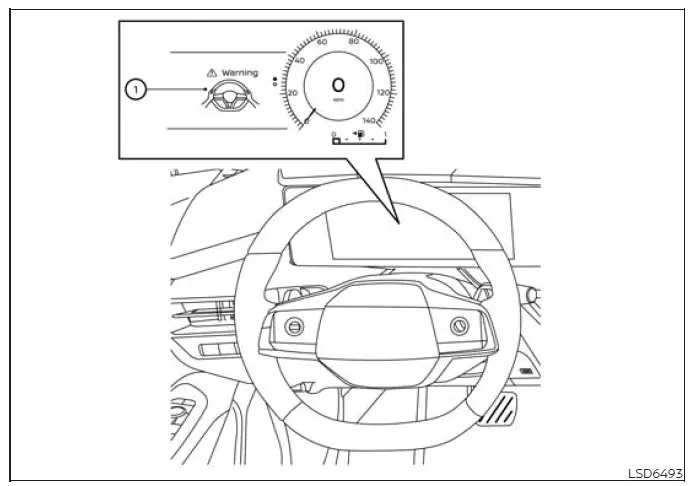
Basic information
When Steering Assist is active, the system monitors the driver's interaction with the steering wheel through capacitive and torque sensors built into the wheel. While ProPILOT Assist is operating in Hands On mode, identified by the green indicator, a warning appears in the vehicle information display if the steering wheel is not operated or the driver removes their hands for a certain period. The hands-off warning light also illuminates. If the Nissan Murano continues to detect no driver input, the warnings increase in intensity as described in the "Warning and Emergency Stop" section.
On vehicles equipped with ProPILOT Assist 2.1, the driver may be required to place their hands on the steering wheel while Lane Change Assist or Passing Assist is being activated or is operating. This requirement may apply even when the ProPILOT Assist 2.1 mode indicator is blue. The driver must respond immediately whenever the system requests hands-on steering control.
NOTE: Under certain conditions, the system may not reliably detect the driver's hand or hands on the steering wheel even when contact is present.
- When the driver is wearing gloves that reduce capacitive contact with the steering wheel surface.
- When a steering wheel cover is installed and interferes with sensor detection.
- When the driver holds only a leather seam, spoke, or another area where hand contact may not be detected correctly.
- If hand contact is not recognized through touch detection, apply light steering torque while maintaining a secure grip on the steering wheel.
Warning and Emergency Stop
In Hands On mode, shown by the green indicator, the Nissan Murano uses capacitive and torque sensors in the steering wheel to determine whether the driver is maintaining contact and providing appropriate steering input. The driver is responsible for keeping their hands on the wheel, remaining attentive, and responding promptly to each warning before the alerts progress to a higher level.
- First warning:
- A message appears in the vehicle information display informing the driver that hands have not been detected on the steering wheel.
- To clear the message, place both hands securely on the steering wheel or apply light steering torque so the system can recognize driver input.
- Second Warning:
- The warning message begins flashing, and increasingly noticeable beeping sounds are produced to attract the driver's attention.
- The driver must immediately return their hands to the steering wheel or apply light steering torque to confirm active control and clear the warning.
- Third Warning:
- The vehicle applies two brief brake pulses to provide a stronger physical alert after the earlier warnings have not been acknowledged.
- The driver must place their hands back on the steering wheel or apply light steering torque to clear the warning and demonstrate control of the vehicle.
- Emergency Stop:
- An emergency warning tone sounds, and a "Manually Steer", "Take Steering Control", and/or "Emergency Stop" warning message appears in the vehicle information display.
- If the driver still does not respond, the vehicle gradually reduces speed and comes to a complete stop within the current travel lane. The hazard warning lights activate automatically when the vehicle slows to approximately 40 MPH (65 km/h).
- After the Nissan Murano is brought to an emergency stop, the vehicle connects to an Emergency Call
(SOS) service operator. The operator can then request assistance from the appropriate public
emergency services, including police, fire, or medical personnel.
For further information about emergency communication and available assistance, see "Emergency Call (SOS) button".
- After the emergency stop function has operated, Steering Assist is disabled and the "Steering Assist OFF" message remains displayed until the ignition switch is turned off and then switched on again.
- To interrupt or deactivate the emergency stop sequence before the vehicle comes to a stop, the driver must firmly return their hands to the steering wheel or apply recognizable steering torque while taking control of the vehicle.
See also:
Operating the power liftgate
Instrument panel switch
WARNING
Before closing the liftgate, make sure all passengers have their hands, arms, and other body parts
completely inside the vehicle. Confirm that n ...
Cleaning the seat tracks
CAUTION
Periodically clean the seat tracks to prevent
reduction of ability to move the seats.
Clean periodically with a high-powered vacuum
cleaner. Dirt and debris may reduce the ability to
adju ...
Cup holders
CAUTION
• Avoid abrupt
starting and braking
when the cup holder is being used
to prevent spilling the drink. If the
liquid is hot, it can scald you or your
passenger.
• Use only
so ...