
Driver monitor
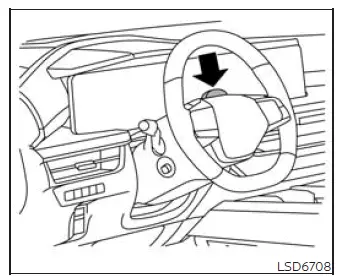
Basic Information
ProPILOT Assist 2.1 uses a driver-facing camera mounted on the steering column to monitor whether the driver is paying attention to the road ahead. The driver monitor operates as an attention-support feature and does not replace the driver's responsibility to remain alert and maintain control of the Nissan Murano at all times.
The system evaluates several visible characteristics, including the position and direction of the driver's head, whether the eyes appear open, and the direction of the driver's gaze. If the camera determines that the driver's attention is not directed toward the road, a sequence of progressively stronger warnings appears to encourage the driver to look forward and resume attentive driving.
NOTE: The driver monitor remains active in all driving modes and is not limited to periods when ProPILOT Assist 2.1 is operating.
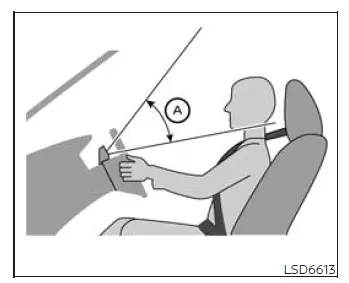
If the driver's face is positioned below the camera detection range A, the driver monitor may not identify the driver's face or attention accurately. Adjust the driving position so the camera has a clear view of the entire face. Depending on the current seating position, this may involve lowering the steering column, raising the seat, or making another suitable adjustment that places the face within the camera's detection area.
Attention to the road
On vehicles equipped with ProPILOT Assist 2.1, the camera-based driver monitor evaluates whether the driver continues to watch the road ahead. The driver is responsible for remaining attentive and responding promptly to each warning. Failure to restore attention may cause the alerts to increase through the following stages:
- First warning:
- A warning beep sounds and a message appears in the vehicle information display to direct the driver's attention back toward the road.
- The driver must look ahead and demonstrate renewed attention to clear the message.
- Second Warning:
- The displayed message changes and instructs the driver to hold the steering wheel.
- The message begins flashing while increasingly noticeable beeping sounds are produced to attract the driver's attention.
- The driver must place their hands on the steering wheel or apply light steering torque to confirm control and clear the warning.
- Third Warning:
- The Nissan Murano applies two brief brake pulses to provide a stronger physical warning after the earlier alerts have not received an adequate response.
- The driver must immediately return their hands to the steering wheel or apply light steering torque to acknowledge the warning and demonstrate control of the vehicle.
- Emergency Stop:
- An emergency warning tone sounds, and a "Manually Steer" and/or "Slowing to Stop" message appears in the vehicle information display.
- If the driver still does not respond, the vehicle gradually reduces speed and comes to a complete stop within the current travel lane. The hazard warning lights activate automatically when vehicle speed reaches approximately 40 MPH (65 km/h).
- After the vehicle has been brought to an emergency stop, a "Manually Steer" message appears and the vehicle connects to an Emergency Call (SOS) service operator. The operator can then request assistance from the appropriate public emergency services, including police, fire, or medical personnel.
- After the emergency stop function has operated, Steering Assist is disabled and the "Steering Assist OFF" message remains displayed until the ignition switch is turned off and then switched on again.
- To deactivate the emergency stop sequence before the vehicle comes to a complete stop, the driver must return their hands to the steering wheel or apply recognizable steering torque while taking control of the vehicle.
See also:
Warning lights
For additional information on warnings and indicators,
see “Vehicle information display” later in
this section.
Anti-lock Braking System
(ABS) warning light
When the ignition switch is placed ...
Rear window and outside mirror defroster switch. Windshield Deicer
Rear window and outside mirror defroster switch
To defrost the rear window glass and outside mirrors, place the ignition switch in the ON position and push the
rear window defroster switch on. P ...
How to use the remote keyless entry function
The remote keyless entry function can operate all
door locks using the remote keyless function of
the Intelligent Key. The remote keyless function
can operate at a distance of 33 ft (10 m) away
fr ...