
System temporarily unavailable
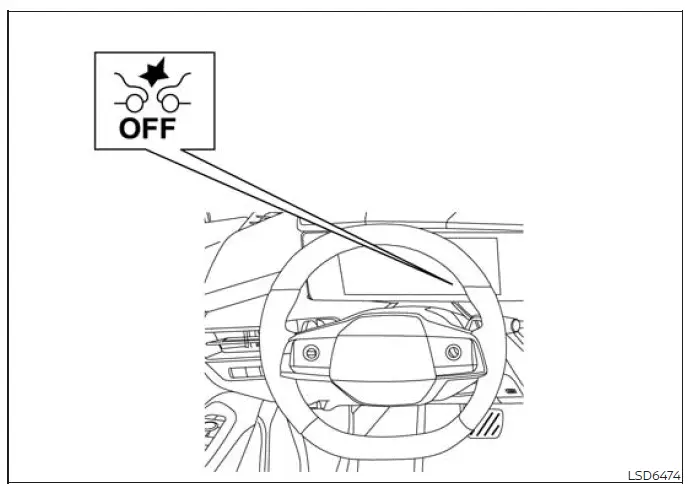
Condition A:
Under either of the following conditions, the AEB with Pedestrian Detection system warning light illuminates and the message "Driving Aids Temporarily disabled Clean sensor area See Owner's Manual" appears in the vehicle information display. The system switches off automatically because the front camera may be unable to monitor the road ahead accurately:
- The windshield area in front of the camera is covered by moisture, condensation, snow, ice, dirt, or another obstruction.
- The camera viewing area of the windshield remains covered with dirt or other material for an extended period.
Action to take
Inspect the windshield area in front of the camera and make sure it is clean, clear, and free from ice or condensation. If necessary, operate the maximum defrosting function or the heated windshield, if equipped, to restore a clear camera view. Depending on the temperature and amount of moisture or ice, clearing the windshield may take several minutes.
Condition B:
Heavy rain, fog, snow, or other severe weather may obstruct the front radar sensor and prevent reliable detection. When this occurs, the AEB with Pedestrian Detection system cancels automatically, its warning light illuminates, and the message "Driving Aids Temporarily disabled Clean sensor area See Owner's Manual" appears in the vehicle information display.
Action to take:
When the weather or sensor-related condition is no longer present, the warning message should disappear from the vehicle information display and system operation should become available again. If the "Driving Aids Temporarily disabled Clean sensor area See Owner's Manual" message remains displayed after conditions improve, have the system inspected.
It is recommended that you visit a NISSAN dealer for this service.
Condition C:
If the radar sensor area in the front bumper is covered by mud, dirt, snow, ice, or another obstruction, the AEB with Pedestrian Detection system switches off automatically because the radar signal may not provide reliable information.
The system warning light illuminates, and the message "Driving Aids Temporarily disabled Clean sensor area See Owner's Manual" appears in the Nissan Murano vehicle information display.
Action to take:
If the warning message appears, move the vehicle to a safe location, select the P (Park) position, and turn off the engine. Inspect the front bumper radar sensor area and carefully remove any mud, dirt, snow, ice, or other material that may be blocking it. After the area has been cleaned, restart the engine.
If the "Driving Aids Temporarily disabled Clean sensor area See Owner's Manual" message continues to appear after the engine is restarted, the system may require inspection. It is recommended that you visit a NISSAN dealer for this service.
Condition D:
When driving in areas with few roadside structures or buildings, the radar may receive insufficient or unusual reflected signals. This can occur on long bridges, across deserts or snowfields, or while traveling beside an extended wall. Under these conditions, the AEB with Pedestrian Detection system warning light may illuminate and the message "Driving Aids Temporarily disabled Clean sensor area See Owner's Manual" may appear.
Action to take:
After the Nissan Murano leaves the affected area and the unusual driving conditions are no longer present, turn the system back on and confirm that the warning message has cleared.
Condition E:
Under the following conditions, the AEB with Pedestrian Detection system warning light illuminates and the message "Driving Aids Temporarily limited Poor Visibility" appears in the vehicle information display because the front camera cannot obtain a sufficiently clear view:
- Strong light is shining directly toward the front of the vehicle and affecting the camera image.
- The windshield area in front of the camera is temporarily fogged or covered with dirt, water droplets, ice, snow, or similar material.
Action to take:
Once the strong light, condensation, or temporary windshield obstruction is no longer affecting the camera, the AEB with Pedestrian Detection system resumes operation automatically.
Condition F:
Under the following condition, the AEB with Pedestrian Detection system warning light illuminates and the message "Driving Aids temporarily limited Front Camera Too Hot" appears in the vehicle information display:
- The passenger compartment temperature rises above approximately 104ºF (40ºC) while the vehicle is exposed to direct sunlight.
Action to take:
Reduce the interior temperature and allow the front camera to cool. When the camera temperature returns to an acceptable operating range, the AEB with Pedestrian Detection system resumes automatically.
Condition G:
Under either of the following conditions, the system warning light illuminates and the message "Driving Aids temporarily limited" appears in the vehicle information display:
- The system check for the warning function does not finish normally.
- The vehicle is being towed.
Action to take:
When the condition that caused the temporary limitation has ended and the required system check can be completed normally, AEB with Pedestrian Detection resumes automatically.
Condition H:
Under the following condition, the AEB with Pedestrian Detection system warning light illuminates and the message "Driving Aids Temporarily limited Radar interference" appears in the vehicle information display.
This warning may appear when the front radar sensor receives interference from another radar source and cannot evaluate the area ahead reliably.
Action to take:
When the source of radar interference is no longer present, the AEB with Pedestrian Detection system resumes operation automatically.
Condition I:
When the Vehicle Dynamic Control (VDC) system is switched OFF, the AEB with Pedestrian Detection system does not provide automatic braking and the message "Limited driver's aid VDC setting OFF" appears in the vehicle information display. In this condition, only the visual and audible collision warnings remain available, and the orange AEB with Pedestrian Detection system OFF warning light illuminates.
Action to take: Switch the VDC system ON. Once VDC operation has been restored, the AEB with Pedestrian Detection system in the Nissan Murano resumes automatically.
NOTE: If the AEB with Pedestrian Detection system becomes unavailable, the Intelligent Forward Collision Warning (I-FCW) system also stops operating.
System malfunction
If the AEB with Pedestrian Detection system detects a malfunction, it switches off automatically. A warning chime sounds, the message "Malfunction See Owner's Manual" appears, and the orange AEB with Pedestrian Detection system warning light illuminates in the vehicle information display.
Action to take
If the orange warning light illuminates, move the vehicle to a safe location, turn off the engine, and then restart it. If the warning light remains illuminated after restarting, the AEB with Pedestrian Detection system may be malfunctioning and should not be relied upon. Have the system inspected; it is recommended that you visit a NISSAN dealer for this service.
See also:
System operation
The sonar system provides visual and audible warnings when it detects obstacles near the vehicle. With the shift
position in D (Drive), the system monitors for obstacles in front of the Nissan Mura ...
Emergency engine shut off
To shut off the engine in an emergency situation
while driving, perform the following procedure:
– Rapidly push the push-button ignition switch 3
consecutive times in less than 1.5 seconds, or
â ...
OFF button
Switch beeps
With this option on (indicator light illuminated), a
beep will sound if any control panel button is
pressed.
To change the display brightness, press
the OFF button. Pressing the b ...