
System operation
The sonar system provides visual and audible warnings when it detects obstacles near the vehicle. With the shift position in D (Drive), the system monitors for obstacles in front of the Nissan Murano. With the shift position in R (Reverse), both the front and rear sensors monitor the surrounding area and provide alerts when applicable.
Sonar Operation Table
FR Sensor
1. Range: P
- Sound: x
- Display: †
2. Range: R
- Sound: o
- Display: o
3. Range: N
- Sound: x
- Display: †
4. Range: D
- Sound: o
- Display: o
RR Sensor
1. Range: P
- Sound: x
- Display: †
2. Range: R
- Sound: o
- Display: o
3. Range: N
- Sound: x
- Display: †
4. Range: D
- Sound: x
- Display: †
o — The system provides a display indication and audible beep when an obstacle is detected.
† — The sonar indication is shown within the camera view.
x — No sonar display indication or audible beep is provided.
The sonar system is deactivated when vehicle speed exceeds approximately 6 mph (10 km/h). It becomes active again automatically after the Nissan Murano slows below this operating threshold.
While the vehicle is moving, the audible warning will stop after approximately three seconds if an obstacle is
detected only by a corner sensor and the measured distance remains unchanged. The warning tone will also stop
when the obstacle moves farther away from the vehicle. The driver can cancel the audible alert at any time using
the left-side steering-wheel  buttons.
When an object is first detected, a green indicator appears and flashes while an intermittent tone sounds. As the vehicle moves closer to the object, the indicator changes to yellow, its flashing becomes faster, and the warning tone increases in frequency. When the vehicle is very close to the detected object, the indicator turns red and remains steadily illuminated while the warning tone sounds continuously.
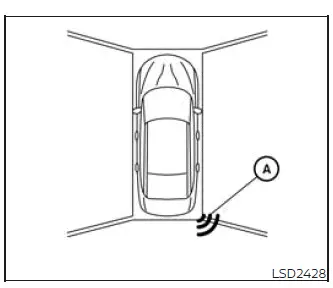
When a corner of the vehicle moves closer to an obstacle, corner sonar indicator A appears to identify the area where the object has been detected.
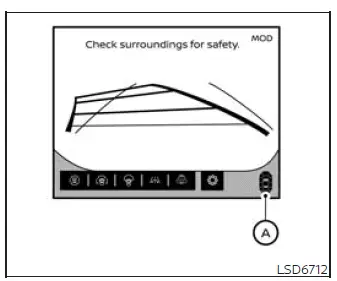
System indicators A, if so equipped, appear as the vehicle approaches an obstacle. Their position and warning level help the driver understand which part of the vehicle is closest to the detected object.
How to enable/disable the front and rear sonar system
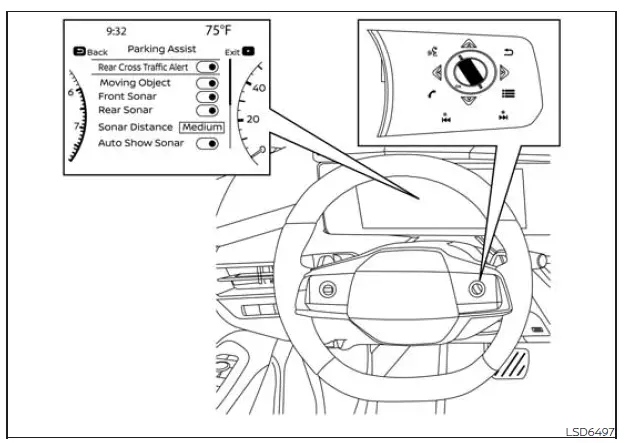
Use the following steps to enable or disable the sonar system and adjust its available settings through the vehicle information display:
1. Press the  button repeatedly until “Settings” appears in
the vehicle information display, and then press the OK button. Use the scroll dial to highlight “Driver
Assistance,” and press the OK button to open the menu.
button repeatedly until “Settings” appears in
the vehicle information display, and then press the OK button. Use the scroll dial to highlight “Driver
Assistance,” and press the OK button to open the menu.
2. Select “Parking Assist,” and then press the OK button to access the sonar-system options.
- Select “Auto Show Sonar,” and press the OK button to enable or disable automatic display of the sonar view whenever the system is activated.
- Select “Front Sonar,” and press the OK button to turn only the front sonar sensors on or off.
- Select “Rear Sonar,” and press the OK button to turn only the rear sonar sensors on or off.
- Select “Sonar Distance” to choose the preferred detection setting: “Long,” “Medium,” or “Short.”
- Select “Sonar Volume” to adjust the audible warning level to “High,” “Medium,” or “Low.”
NOTE: The sonar system turns on automatically each time the engine is started, provided that the function remains enabled in the settings menu of the vehicle information display.
See also:
Read first—then drive safely
Before driving your vehicle, please read this
Owner’s Manual carefully. This will ensure familiarity
with controls and maintenance requirements,
assisting you in the safe operation of your
vehic ...
Cigarette lighter and ashtray (if so equipped)
To open the ashtray lid, push the lid down and
release it1 .
To empty the ashtray, pull out2 .
The cigarette lighter operates when the ignition
switch is in the ON position.
Push the ligh ...
Basic Information
WARNING
Head restraints/headrests are designed to work together with the other vehicle safety systems. In certain
rear-end collisions, they may provide additional protection by helping suppor ...