
Intelligent Driver Alertness (I-DA) system limitations
Basic Information
WARNING The operating limitations of the I-DA system are listed below. The driver must understand these limitations and operate the Nissan Murano accordingly. Failure to remain attentive or relying on the system in conditions where it may not function correctly could result in loss of vehicle control, serious injury, or death.
- The I-DA system may not operate as intended and may not provide a warning under the following
conditions:
- Poor road conditions, including uneven pavement, rough surfaces, or potholes, that cause frequent or irregular steering corrections.
- Strong crosswinds or sudden side winds that require the driver to make repeated steering adjustments to maintain the vehicle’s direction.
- Driving with a sporty style that includes higher cornering speeds, rapid acceleration, or steering behavior that differs significantly from normal driving patterns.
- Frequent lane changes or repeated changes in vehicle speed that make it difficult for the system to establish and evaluate a consistent driving pattern.
- The I-DA system will not provide an alert under the following conditions:
- The Nissan Murano is traveling at a speed below 37 mph (60 km/h).
- The driver experiences only a brief lapse of attention that is too short for the system to identify as a developing pattern.
- The driver is affected by a sudden, momentary distraction, such as dropping an object inside the vehicle. The system is not designed to recognize every immediate distraction.
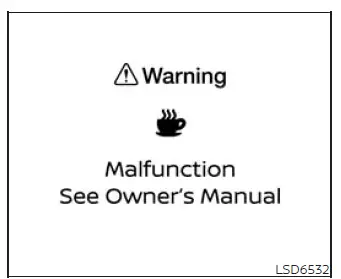
System malfunction
If the Intelligent Driver Alertness system detects a malfunction, a system warning message will appear in the vehicle information display and an audible chime will sound. The I-DA function will then stop automatically and will no longer evaluate driving style or provide driver-attention warnings until normal operation is restored.
Action to take
Stop the vehicle in a safe location, place the shift position in P (Park), turn off the engine, and then restart it. After restarting the Nissan Murano, check whether the system warning message has disappeared. If the message remains displayed or appears again, have the I-DA system inspected. It is recommended that you visit a NISSAN dealer for this service.
Break-in schedule
CAUTION During the first 1,200 miles (2,000 km), follow the recommendations below to support proper break-in of the vehicle and help achieve maximum engine performance, long-term reliability, and fuel economy. Ignoring these guidelines may shorten engine life or reduce future engine performance.
- Avoid driving for extended periods at one constant speed, whether high or low. Vary vehicle speed and engine load naturally, and do not operate the engine above 4,000 rpm during the break-in period.
- Do not use full-throttle acceleration in any gear. Apply the accelerator smoothly and allow the engine and related components to adapt gradually under moderate loads.
- Avoid rapid starts and aggressive acceleration from a stop. Smooth starts help reduce unnecessary stress on the engine and drivetrain while the new components are settling into normal operation.
- Avoid hard or abrupt braking whenever possible. Use gradual braking so the braking components can wear in evenly during the early mileage period.
- Do not tow a trailer during the first 500 miles (805 kilometers). Towing during this initial period may place excessive load on the Nissan Murano engine, axle, or other drivetrain components and could cause damage.
See also:
Audio operation precautions
Compact disc (CD) player (models
without Navigation System)
Compact disc (CD) player (models
without Navigation System)
● Do not force a compact disc into the CD
insert slot. This could d ...
HomeLink® Universal Transceiver (if so equipped)
The HomeLink® Universal Transceiver provides a
convenient way to consolidate the functions of
up to three individual hand-held transmitters into
one built-in device.
HomeLink® Universal Transc ...
Aluminum alloy wheels
Wash regularly with a sponge dampened in a
mild soap solution, especially during winter
months in areas where road salt is used. Salt
could discolor the wheels if not removed.
CAUTION
Follow the ...