
Instrument panel
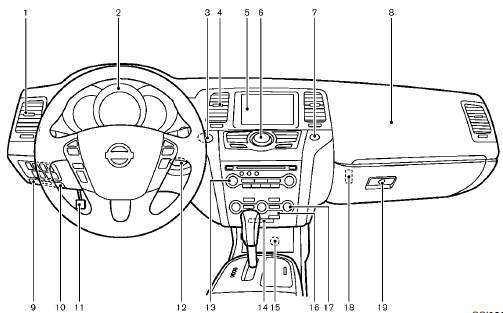
1. Side ventilator
2. Meters and gauges
3. Push-button ignition switch
4. Center ventilator
5. Center display
— Center color display
— Navigation system
6. Heater/air conditioner control or Center
multi-function control panel
— Navigation system
— Vehicle information and setting buttons
— Bluetooth® Hands-Free Phone System
(models with navigation system)
— Bluetooth® Hands-Free Phone System
(models without navigation system)
7. Hazard warning flasher switch
8. Front passenger supplemental air bag
9. Hood release handle
10. Fuse box cover
11. Parking brake
12. Intelligent Key port
13. Audio system
— Clock
14. Front passenger air bag status light
15. Power outlet
16. Rear window and outside mirror defroster
switch
17. Heater/air conditioner control or Audio
system
18. Trunk release power cancel switch (Cross-
Cabriolet models)
19. Glove box
*: if so equipped
**: Refer to the separate Navigation System Owner’s
Manual (if so equipped).
See also:
Models with color display
To adjust the clock on the front color display, use
the SETTING button on the center multifunction
control panel. See “How to use
SETTING button” in the “4. Monitor, heater, air
conditioner, ...
Brake fluid
WARNING
● Use only new fluid from a sealed container.
Old, inferior or contaminated
fluid may damage the brake system.
The use of improper fluids can damage
the brake system and affect ...
Intelligent Key battery discharge
If the battery of the Intelligent Key is almost
discharged, the guide light B of the key port
A blinks and the indicator appears on the dot
matrix liquid crystal display. (See “Dot ...