
Brake fluid
WARNING
● Use only new fluid from a sealed container.
Old, inferior or contaminated fluid may damage the brake system.
The use of improper fluids can damage
the brake system and affect the vehicle’s
stopping ability.
● Clean the filler cap before removing.
● Brake fluid is poisonous and should be
stored carefully in marked containers
out of reach of children.
CAUTION
Do not spill the fluid on any painted surfaces.
This will damage the paint. If fluid is spilled, immediately wash the surface with water.
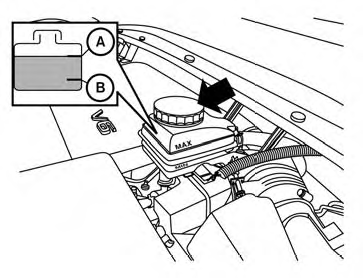
Check the fluid level in the reservoir. If the brake fluid is below the MIN line B , the brake warning light will illuminate. Add brake fluid up to the MAX line A . (See “RECOMMENDED FUEL/LUBRICANTS AND CAPACITIES” in the “ Technical and consumer information” section for the recommended type of brake fluid.) If the brake fluid must be added frequently, the brake system should be thoroughly checked by a NISSAN dealer.
See also:
How to park with predictive course lines
WARNING
• Always turn and check that it is
safe
to do so before backing up. Always
back up slowly.
• Use the displayed lines as a reference.
The lines are highly affected
by the number o ...
Receiving a call
When you hear a phone ring, the display will
change to phone mode. To receive a call, follow
one of the procedures listed below.
a. Select the “Answer” key on the display.
b. Press the phone ...
Map pockets
Front Console ...