
Meters and gauges
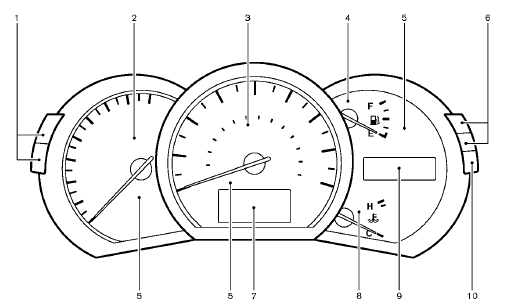
1. Instrument brightness control switch
2. Tachometer
3. Speedometer
4. Fuel gauge
5. Warning/indicator lights
6. Trip computer switch
7. Dot matrix liquid crystal display
— Trip computer
8. Engine coolant temperature gauge
9. Odometer/twin trip odometer /Continuously
Variable Transmission (CVT) position
indicator
10. RESET switch for trip odometer
See also:
Electric operation
Tilt or telescopic operation
Move the lever to adjust the steering wheel up or
down, forward or rearward to the desired
position.
Entry/Exit function operation:
The automatic drive positioner s ...
Dual head restraint DVD system (if so equipped)
If your vehicle is equipped with the Dual Head
Restraint DVD System, you can enjoy playing
video files via a DVD, CD or USB memory that
provides images and sound both from the front
and rear displ ...
Operational indicators
1. Engine start operation indicator
This indicator appears when the shift lever is in
the P (Park) position.
This indicator means that the engine will start by
pushing the ignition switch with ...