
Rear window wiper and washer switch (Hardtop models)
WARNING
In freezing temperatures the washer solution may freeze on the rear window glass and obscure your vision. Warm the rear window with the defroster before you wash the rear window.
CAUTION
• Do not
operate the washer continuously
for more than 30 seconds.
• Do not operate
the washer if the
reservoir tank is empty.
• Do not fill the
window washer
reservoir tank with washer fluid
concentrates at full strength. Some
methyl alcohol based washer fluid
concentrates may permanently stain
the grille if spilled while filling the
window washer reservoir tank.
• Pre-mix washer
fluid concentrates
with water to the manufacturer’s
recommended levels before pouring
the fluid into the window washer
reservoir tank. Do not use the
window washer reservoir tank to
mix the washer fluid concentrate
and water.
If the rear window wiper operation is interrupted by snow or ice, the wiper may stop moving to protect its motor. If this occurs, turn the wiper switch to the OFF position and remove the snow or ice that is on and around the wiper arms. In approximately 1 minute, turn the switch on again to operate the wiper.
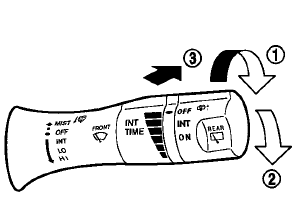
Type A
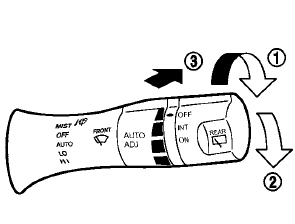
Type B
The rear window wiper and washer operate when the ignition switch is in the ON position.
Turn the switch clockwise from the OFF position to operate the wiper.
1 Intermittent (INT) — intermittent operation (not
adjustable)
2 Low (ON) — continuous low speed operation
Push the switch forward 3 to operate the washer. Then the wiper will also operate several times.
See also:
Windows
WARNING
• Make sure
that all passengers have
their hands, etc. inside the vehicle
while it is in motion and before
closing the windows. Use the window
lock switch to prevent unexpected
use o ...
Automatic anti-glare rearview mirror (if so equipped)
The inside mirror is designed so that it automatically
dims during night time conditions and according
to the intensity of the headlights of the
vehicle following you. The automatic anti-glare
fea ...
Corrosion protection
Most common factors contributing to
vehicle corrosion
Vehicle corrosion most commonly develops when moisture, dirt, road residue, and damage to protective exterior
finishes are allowed to ...