
Cargo floor box (if so equipped for Hardtop models)
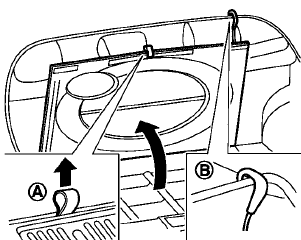
Type A
Type A
1. To open the cargo floor box, pull the strap
A .
2. Remove the strapB from the back side of
the board and hang it on the lip of the lift
gate.
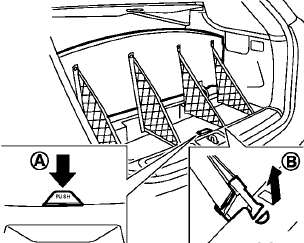
Type B
Type B
To open the cargo floor box, pushA . To close, push the lid until the lock latches.
The net partitions can be removedB to make a larger storage space.
The cargo floor box needs to be removed when you need a spare tire. (See “Flat tire” in the “6. In case of emergency” section.)
CAUTION
To avoid damage, do not load more than 22 lbs (10 kg) of cargo into the cargo floor box.
See also:
NISSAN Advanced Air Bag System
(front seats)
Basic Information
Supplemental front-impact air bag modules, positioned to help provide additional protection for the driver
and front passenger during certain frontal collisions.
...
Basic Information
The front and rear sonar system uses ultrasonic sensors installed in the front and rear bumpers to detect certain
obstacles near the vehicle. When an object is detected, the system sounds a tone ...
Vehicle loading information
WARNING
• It is extremely dangerous to ride
in a cargo area inside the vehicle.
In a collision, people riding
in these areas are more likely to
be seriously injured or killed.
• Do not all ...