
Cargo cover (if so equipped for Hardtop models)
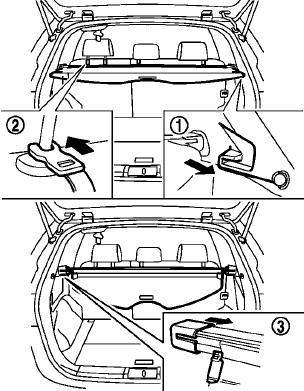
The cargo cover keeps the contents in the cargo area hidden from the outside.
To use the cargo cover, pull it out and hang both sides on the hooks1 .
To use the sub cover, hang the straps on the back of the head restraint2 .
To stow the cargo cover, remove it from the hooks and hold until it is retracted.
To remove the cargo cover, stow the cover and pull the left side of the holder to the opposite side3 .
WARNING
• Never put
anything on the cargo
cover, no matter how small. Any
object on it could cause an injury
in an accident or sudden stop.
• Close the cargo
cover when folding
the rear seat.
• Do not leave the
cargo cover in the
vehicle with it disengaged from the
holder.
• Properly secure
all cargo with ropes
or straps to help prevent it from
sliding or shifting. Do not place
cargo higher than the seatbacks. In
a sudden stop or collision, unsecured
cargo could cause personal
injury.
• Your child could
be seriously injured
or killed in a collision if the child
restraint top tether strap is damaged.
— If the cargo cover contacts the top tether strap when it is attached to the top tether anchor, remove the cargo cover from the vehicle or secure it on the cargo floor below its attachment location.
If the cargo cover is not
removed, it may damage the top
tether strap during a collision.
— Do not allow cargo to contact
the top tether strap when it is
attached to the top tether anchor.
Properly secure the cargo so it does not contact the top tether strap. Cargo that is not properly secured or that contacts the top tether strap may damage the top tether strap during a collision.
See also:
Manual operation (if so equipped)
Tilt and telescopic operation
Pull the lock lever 1 down:
● Adjust the steering wheel forward or backward
in direction 3 to the desired position.
● Adjust the steering wheel up or do ...
Tire and Loading Information label
The cold tire pressure is shown on the Tire and
Loading Information label affixed to the pillar as
illustrated. ...
In-cabin microfilter
The air conditioning system is equipped with an
in-cabin microfilter which collects dirt, pollen,
dust, etc. To make sure the air conditioner heats,
defogs, and ventilates efficiently, replace the
...